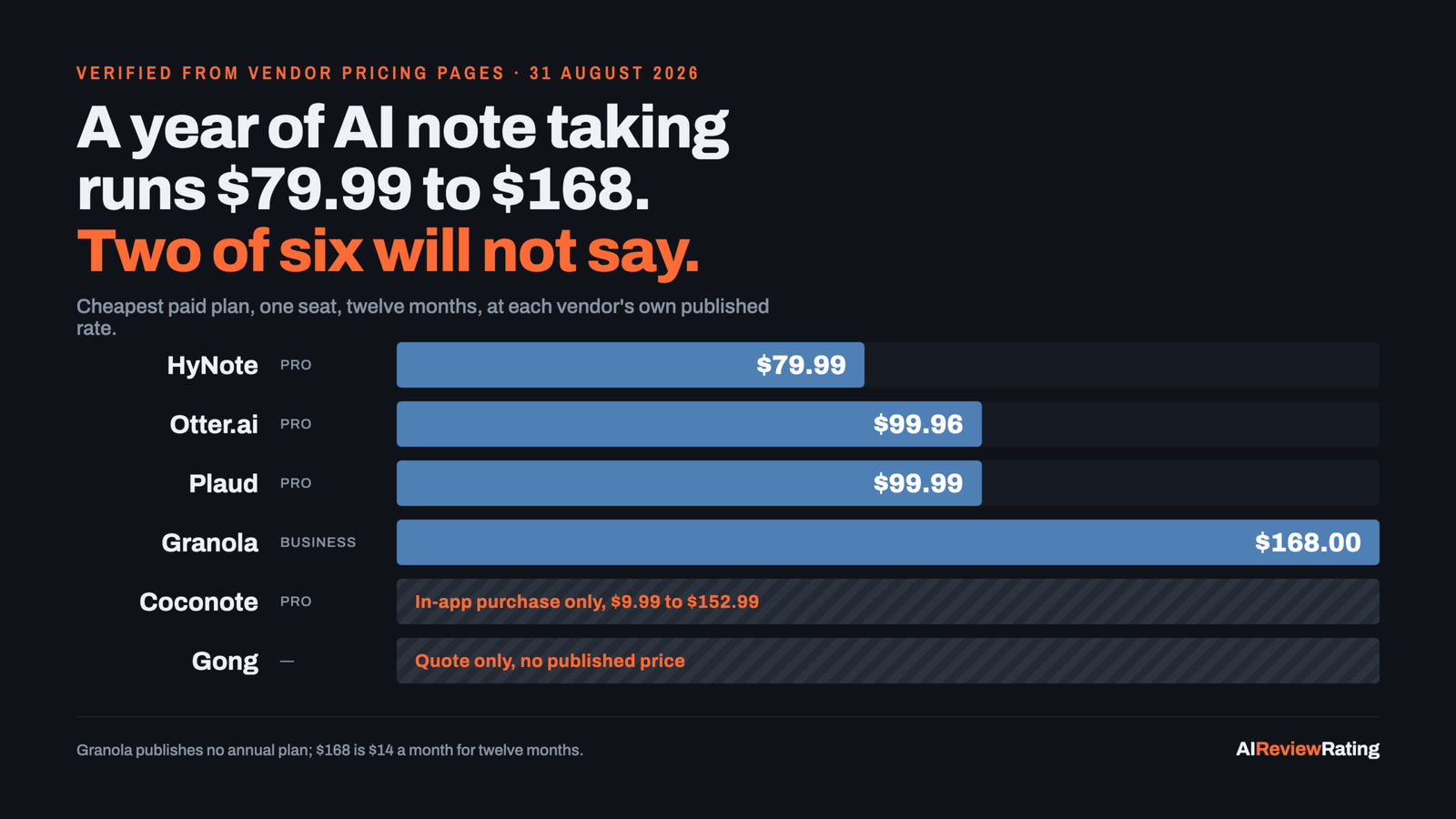
Short answer, prices as of 30 August 2026 (HyNote as of 17 October 2026): our pick is HyNote, the cheapest way to buy 1,200 transcription minutes a month and the only tool here that also handles PDFs, YouTube links and phone calls. Granola scores highest of the seven at 6.7 (level with Plaud on the rounded figure) and is the better choice if all you do is video calls on a laptop, and Plaud is the only real option for conversations that happen in a room. If you came here after reading about NotebookLM, it is now called Gemini Notebook and it does not record meetings at all.
Disclosure: HyNote is our pick, and we earn a commission if you subscribe through our link. We place the tools we earn on first in our listings, here and across the site. That placement does not touch the score: HyNote scores 6.0 and Granola scores 6.7, both printed in every table below, and the rubric that produces them is published. Read the ranking as “our pick first, then by score”, because that is what it is.
| Pick | Built for | Cheapest paid plan | A year costs |
|---|---|---|---|
| 🥇 HyNote Our pick | Anything that is not a meeting: PDFs, YouTube, phone calls | $11.99 a month, $79.99 a year | $79.99 |
| 🥈 Granola | Laptop meetings, notes in your own words | $14 a user a month | $168 |
| 🥉 Plaud | Conversations in a room, not on a screen | $17.99 a month, $99.99 a year | $99.99 plus a device |
The number this category refuses to publish
Every comparison of these tools lists a monthly price. That is the wrong number, because the plans do not include the same amount of transcription. Three of these vendors sell exactly 1,200 minutes a month at their middle tier, which makes them directly comparable for the first time.
| Tool | Plan | Minutes a month | A year | Per 1,000 minutes |
|---|---|---|---|---|
| HyNote | Pro | 1,200 | $79.99 | $5.55 |
| Otter.ai | Pro | 1,200 | $99.96 | $6.94 |
| Plaud | Pro | 1,200 | $99.99 | $6.94 plus hardware |
| Granola | Business | Unlimited | $168 | $11.67 at 1,200, less above that |
HyNote is the cheapest of the three, at $5.55 per 1,000 minutes against $6.94 for Otter and Plaud. On a heavy month of 20 hours of calls, the gap is small in absolute terms. On a team of five over a year it is the difference between one seat and none.
Granola is not sold this way. Its Business plan is unlimited, so its effective rate falls the more you use it. The crossover is at 1,200 minutes a month: below that, HyNote Pro at $79.99 is the cheapest way to buy the volume; above it you need HyNote Unlimited at $189.99, and Granola Business at $168 becomes the cheaper unlimited plan.
The billing trap that costs more than choosing the wrong tool
Every vendor here except Granola shows an annual rate by default and charges considerably more if you pay monthly. On HyNote the pricing page opens on the annual view, so the headline of $6.66 is really $11.99 if you want to cancel any month, and its one-time credits are halved on monthly billing (Pro gets 150 instead of 300).
| Tool and plan | Paying monthly | Paying annually | Monthly costs you |
|---|---|---|---|
| Plaud Pro | $17.99 | $8.33 a month | 116% |
| Otter.ai Pro | $16.99 | $8.33 a month | 104% |
| HyNote Pro | $11.99 | $6.66 a month | 80% |
| HyNote Unlimited | $24.99 | $15.83 a month | 58% |
There is a second, smaller trap worth knowing: HyNote mostly costs more inside the iOS app than on its website. Apple lists the Unlimited yearly plan at $199.99 against $189.99 on the site, and the Pro yearly at $89.99 against $79.99. Buy on the web.
The divide that actually decides this: does a bot join the call?
The most useful way to cut this shortlist has nothing to do with summary quality, which is broadly similar now. It is whether the tool sends a participant into your meeting.
Granola and HyNote capture device audio, so nothing appears in the attendee list. Otter joins visibly. Plaud sidesteps the question by recording the room. Some organisations require the visible bot, because a thing everyone can see is easier to consent to; others forbid it, because clients ask what it is. Neither is wrong, but the answer removes half the market for you in one step.
The trade-off shows up in the Reddit threads. In the largest one, 200-plus comments in r/AI_Agents, the top-voted reply likes Granola but says it “doesn’t distinguish between different people”. That is the cost of capturing one microphone rather than separate streams, and it is worth knowing before you buy for a roundtable rather than a video call.
The whole category on one screen
Seven tools, what each is really for, and what it costs before you talk to anyone.
| Tool | Our score | From | Free tier | What it is really for |
|---|---|---|---|---|
| 🥇 HyNote Our pick | 6.0 | $11.99 a month | Yes | widest capture surface |
| 🥈 Granola | 6.7 | $14 a month | Yes | the notepad, not the notetaker |
| 🥉 Plaud | 6.7 | $17.99 a month | Yes | in-person capture |
| Otter.ai | 6.2 | $16.99 a month | Yes | the incumbent |
| Gong | 5.2 | Quote only | No | enterprise revenue intelligence |
| Coconote | 3.1 | In-app only, $9.99 to $152.99 | Yes | students and lectures |
| Gemini Notebook | 5.1 | $7.99 a month | Yes | research over sources you already have |
The free tiers, compared honestly
“Free” means six different things in this category.
| Tool | What the free plan gives you | The catch |
|---|---|---|
| HyNote | Recording and transcription, up to 120 minutes a session; the free Mac app has no recording cap | No monthly transcription cap is stated for the web plan, which is unusual enough to verify before relying on it |
| Granola | Unlimited notes | Notes older than 30 days need a paid plan to view |
| Otter.ai | 300 transcription minutes a month | Three file imports for the life of the account |
| Plaud | 300 transcription minutes a month | Included with a device, so the free tier costs $159 or more |
| Gemini Notebook | Unlimited use with a Google account | It cannot record a meeting at all |
| Coconote | Free download and use | Limits are not published anywhere on the web |
| Gong | Nothing | No free tier and no self-serve signup |
Every tool, ranked
Our picks first, then our score descending. That is the same order the category page and every alternatives block on this site use, and the score beside each name is the unmodified one, so you can see exactly how far a pick has been moved.
🥇 1. HyNote Our pick: An AI note taker that takes eight kinds of input, not just meetings, and prices its top tier below most rivals’ mid tier.
Our score 6.0 out of 10. From $11.99 a month or $79.99 a year, verified 17 October 2026.
HyNote is the widest net. Eight input types, more than thirty templates, no bot in the call, a free Mac app, and the cheapest 1,200-minute plan of anyone who publishes one. The reservations are about the paper trail rather than the product: there is no compliance report behind its security page (the SOC 2 and HIPAA homepage line from August is gone), no documented REST API and no status page. It does now publish a changelog at hynote.ai/updates and a public MCP server.
Built for: one subscription covering meetings, documents, videos and phone calls
Skip it if: you need a documented REST API or a compliance report today
What works
- Takes eight input types, so PDFs, YouTube links and phone calls go through the same tool as meetings
- Unlimited tier at $189.99 a year sits below what Otter charges for its mid tier
- Records meetings without adding a bot to the participant list
What to watch
- The pricing page opens on annual rates, so the $6.66 headline is really $11.99 if you pay monthly, and the one-time credits halve (Pro 150 against 300)
- Buying inside the iOS app costs more on most plans: Unlimited is $199.99 a year in-app against $189.99 on the site (Plus monthly is the one exception, $1 cheaper in-app)
- The security page cites GDPR and CCPA alignment and third-party penetration testing but names no auditor, report or certification; the SOC 2 Type II and HIPAA line we recorded on the homepage in August is no longer on the site
Full breakdown: HyNote. Sign up: HyNote.
🥈 2. Granola: A notepad that listens while you type, aimed at people whose calendar is wall to wall.
Our score 6.7 out of 10. From $14 a month, verified 30 August 2026.
Granola inverts the usual design. You type rough notes during the call and it fills in what was actually said afterwards, so the output reads like your notes rather than a transcript summary. It captures computer audio, so nothing joins the meeting. The free plan does not cap minutes, only history: notes older than 30 days need a paid plan. Business at $14 a user includes API and MCP access, which almost everyone else reserves for enterprise deals.
Built for: back-to-back video calls on a laptop, where you want notes in your own voice
Skip it if: you need PDFs, YouTube links or in-person capture, or speaker labels you can trust
What works
- No bot joins the call, so nothing announces itself to the other side
- Free tier allows unlimited note taking rather than a minute cap
- API and MCP access included at $14 a user, which most rivals reserve for enterprise
What to watch
- Free notes disappear from view after 30 days unless you upgrade
- Built around meetings, so PDFs, YouTube links and phone calls are out of scope
- Capturing computer audio means the machine has to be in the room, which rules out in-person capture on a phone alone
Full breakdown: Granola.
🥉 3. Plaud: Hardware first: a recorder you wear or clip to a phone, with the AI plan sold alongside it.
Our score 6.7 out of 10. From $17.99 a month or $99.99 a year, verified 30 August 2026.
Plaud is hardware. It sells recorders you wear or clip to a phone, and the AI plan is sold alongside, which makes it the only product here designed for conversations that never touch a video call. It also has the deepest developer surface of any consumer tool in this comparison: a device SDK, an API, an MCP server, a CLI and a real release-notes page. The cost of entry is a device, from around $159.
Built for: site visits, consultations and any conversation across a table
Skip it if: you will not buy hardware, or recording consent is unresolved where you work
What works
- The only tool here built for in-person conversation, where laptop-audio tools cannot help
- Publishes a device SDK, API, MCP server and CLI
- Every device includes the Starter plan at no extra cost
What to watch
- Hardware first: the desktop app requires a device, and the devices start around $159
- Monthly billing costs $29.99 for Unlimited against $19.99 on annual
- Consent is the buyer’s problem: a wearable recorder raises rules that a bot in a video call does not
Full breakdown: Plaud.
4. Otter.ai: The incumbent transcription service, now sold as a meeting agent, with the strictest free tier of the group.
Our score 6.2 out of 10. From $16.99 a month or $99.96 a year, verified 30 August 2026.
Otter has been doing this longest and now positions itself as a meeting agent rather than a transcription service, with workflows that draft follow-ups and agents aimed at sales and recruiting. It is the safe institutional choice: SSO, SCIM, an API and webhooks all exist, on Enterprise. It also has the tightest free tier here and the steepest penalty for paying monthly.
Built for: teams that need an established vendor, SSO and an API
Skip it if: you will not commit to annual billing, since monthly costs more than double
What works
- Longest track record in the category and the widest integration list
- Annual billing halves the price to $8.33 a user a month
- API and webhooks exist, which most consumer note takers lack
What to watch
- Free tier is 300 minutes a month and only 3 file imports ever, the tightest here
- Paying monthly costs $16.99 against $8.33 on annual, a 104% premium for flexibility
- HIPAA compliance is a paid add-on on the Enterprise tier rather than included
Full breakdown: Otter.ai.
5. Gong: Not a note taker: a revenue platform that happens to record calls, priced by quote and aimed at sales leadership.
Our score 5.2 out of 10. Quote only, verified 30 August 2026.
Gong is in this list because people search for it here, not because it competes. It is a revenue platform that analyses a whole sales team’s calls for forecasting and coaching. Licences are per user with a platform fee on top, nothing is published, and there is no free tier or self-serve signup.
Built for: sales organisations buying revenue analytics with a procurement process
Skip it if: you are an individual or a small team; there is no way to try it
What works
- Built for a revenue team’s reporting, not an individual’s notes
- Integrations with an existing tech stack are included rather than charged for
- Public developer documentation
What to watch
- No published price at all: every buyer goes through a form and a proposal
- A platform fee sits on top of per-user licences, so the entry cost is not linear
- No free tier and no self-serve signup, so it cannot be trialled the way the others can
Full breakdown: Gong.
6. Coconote: A student note taker owned by Quizlet that turns a lecture into flashcards, quizzes and a study plan.
Our score 3.1 out of 10. In-app only, $9.99 to $152.99, verified 30 August 2026.
Coconote is built for coursework and owned by Quizlet. Record a lecture or upload a reading and it returns notes, flashcards, quizzes, practice exams and podcasts. It has the largest ratings sample in this comparison at 16,544 iOS ratings. It also has the least transparent pricing of any product we list: no pricing page at all, and ten different in-app purchases between $9.99 and $152.99.
Built for: students turning lectures into revision material
Skip it if: you want meeting features like calendar sync or a CRM hand-off
What works
- Built for coursework rather than meetings, with flashcards and quizzes as first-class output
- 4.8 average from 16,544 iOS ratings, the largest sample in this group
- Backed by Quizlet rather than an unknown publisher
What to watch
- No pricing page: coconote.app/pricing returns 404 and prices only appear inside the app
- Apple lists ten different Coconote Pro purchases from $9.99 to $152.99 with no explanation of the difference
- Aimed at study, so meeting features like speaker labels and calendar sync are not the point
Full breakdown: Coconote.
The one that keeps appearing here but does not belong
Gemini Notebook is the tool most often recommended in these searches by people who have not used it for meetings, because it cannot do meetings. There is no bot, no live transcription and no calendar hook. What it does, extremely well and for free, is reason over sources you give it and cite the exact passage it used. Record with something on this page, then upload the transcript to Gemini Notebook when you need to think across twenty of them at once.
Also worth knowing: it was renamed. notebooklm.google now returns a permanent redirect to notebook.google, and Google’s own structured data calls the product Gemini Notebook. Any comparison still calling it NotebookLM has not been checked since the rename.
How we test, and what we will not do
Prices come from each vendor’s own pricing page, read by hand on 30 August 2026 (HyNote again on 17 October 2026), with the page saved. App ratings come from Apple’s and Google’s own store listings. We do not take prices, ratings or review text from G2 or any other review aggregator, because republishing their compilations is both against their terms and the opposite of useful.
Scores are produced by a rubric that measures evidence, not enthusiasm: pricing clarity, free access, documentation, maintenance signals, how much we could verify, and whether there is a public API. An automated pass tops out at 8.5 out of 10. The last 1.5 points are reserved for a dated hands-on review by a named person, so none of the tools here has them. How we score.
Where a vendor’s own pages disagree with each other, we say so rather than picking the flattering one.
Questions people actually ask
What is the best AI note taker in 2026?
Our pick is HyNote: it covers the widest range of inputs and is the cheapest plan of anyone selling 1,200 transcription minutes a month, at $79.99 a year. We earn a commission on it, which is why it is placed first, so here is the number that is not: on our rubric Granola scores highest at 6.7 (level with Plaud on the rounded figure) against HyNote’s 6.0, because it publishes an API on a $14 plan and HyNote publishes no REST API (its MCP server, launched 12 October, is a connector, not an API in our rubric). If your week is only laptop video calls, take Granola. If your meetings happen in a room, Plaud is the only one built for that.
What is the best free AI note taker?
Granola if you only need the last 30 days, since its free plan does not cap minutes. HyNote if you need longer retention, because its free plan includes recording and transcription rather than a countdown. Otter.ai‘s free plan is the tightest of the group at 300 minutes a month and three file imports ever.
Which AI note taker works for in-person meetings?
Plaud, because it sells a physical recorder. Everything else here captures a computer’s audio or joins a video call, which does not help across a table. This is the single most repeated unanswered question in the Reddit threads on this topic, including a 50-comment r/AI_Agents thread asking specifically for one that separates speakers.
Is NotebookLM a good AI note taker?
It is now called Gemini Notebook, and it does not record meetings at all. notebooklm.google returns a permanent redirect to notebook.google. Gemini Notebook is excellent at reasoning over sources you upload, with citations back to the exact passage, so it works well alongside a note taker and not instead of one.
Do I need an AI note taker that joins the call as a bot?
No, and the split is the most useful way to choose. Bot-free tools (Granola, HyNote) capture device audio, so nothing appears in the participant list and nobody asks what the extra attendee is. Bot-based tools join visibly, which some organisations require for consent and record keeping. Decide that first and the shortlist halves.
Which is cheaper, monthly or annual?
Annual, by more than most buyers expect. Paying monthly costs 116% more on Plaud Pro, 104% more on Otter Pro and 80% more on HyNote Pro. On a tool you will use for a year, that is the largest single saving available in this category.
What about Gong?
Gong is not a note taker and buying it as one would be a mistake. It is a revenue platform for sales organisations, priced by quote with a platform fee on top of per-user licences, and there is no free tier or self-serve signup to try it.
Which AI note taker is best for students in 2026?
Coconote, which is owned by Quizlet and turns a lecture into flashcards, quizzes and practice exams. It carries 16,544 iOS ratings at 4.8, the largest sample here. The catch is that it publishes no pricing at all: Apple lists ten separate Pro purchases between $9.99 and $152.99.
Related reading on this site
- HyNote review, the budget note taker reviewed on its own.
- AI sales tools priced per seat, where Gong sits in a sales stack, and why the tool Google’s AI Overview leads with prints no price.
- Open source alternatives to paid AI tools, faster-whisper, the self-hosted transcription swap, inside a small team’s whole software bill.
- AI voice generators and what paid buys over free, the opposite job, text turned into speech.
Sources
Every price on this page was read off the vendor’s own page on 30 August 2026, except HyNote, which we re-read on 17 October 2026 and the page was kept. We do not take pricing from review aggregators.
- HyNote pricing, read 17 October 2026
- HyNote updates feed, read 17 October 2026
- Granola pricing, read 30 August 2026
- Otter.ai pricing, read 30 August 2026
- Plaud AI plan pricing, read 30 August 2026
- Gong pricing, read 30 August 2026
- Gemini Notebook, and the permanent redirect from notebooklm.google, checked 31 August 2026
- Coconote on the App Store, in-app purchase list read 31 August 2026
- r/AI_Agents: what is actually the best AI note taking app for meetings, 200+ comments
- r/AI_Agents: is there an AI note taker for in person meetings, 50+ comments
- r/venturecapital: what AI do you use for meeting notes, 60+ comments
- 5 Best AI Note Taker Apps for Meetings in 2026, Joseph Chandler
- Top 5 Bot-Free AI Meeting Note Taking Apps, Joseph Chandler
Comments
Sign in to join the discussion.
Login to comment