Short answer, as of 17 October 2026: HyNote is the cheapest way to buy 1,200 transcription minutes a month, at $79.99 a year against $99.96 for the equivalent Otter plan, and it is the only tool in this category that also turns PDFs, YouTube links, screenshots and phone calls into notes. Two things to check before you buy: the pricing page opens on annual rates (and halves the one-time credits on monthly billing), and it publishes no compliance report.
Disclosure: HyNote is our pick, and we earn a commission if you subscribe through our link. We place the tools we earn on first in our listings, which is why it leads our note taker ranking. The score is a separate thing and is not adjustable by hand: HyNote scores 6.0 out of 10 and Granola scores 6.7. Both numbers sit beside the placement in that ranking, so you can see exactly what the commercial relationship did and did not change.
What HyNote actually is
Most tools in this category are meeting recorders. HyNote is a note taker that treats a meeting as one input of eight. The same account handles live audio, uploaded recordings, video, PDFs, image OCR, YouTube links, web page capture and phone calls, and turns any of them into a transcript, a summary and an action list through more than thirty templates, from meeting minutes to SWOT to interview notes.
That breadth is the whole case for it. If your week is only Zoom calls, it is one of many good options. If your week is Zoom calls plus a 60-page PDF, a recorded site visit and two client phone calls, it is the only tool on our list that covers all four without a second subscription.
It records Zoom, Google Meet, Teams and Webex from your device rather than sending a bot into the call, with speaker identification, timestamps and translation. Its marketing pages say 50+ languages and its help centre says 36 for audio transcription. It runs on iOS, Android, web, Mac and Chrome, with an Apple Watch companion, and exports to Google Docs, Notion, PDF and TXT.
Two things changed in the autumn. HyNote for Mac, released on 28 September, is free with unlimited recording minutes and transcribes on the device, which needs an M1 or newer chip for its Local AI. And the integrations page now lists ChatGPT, Claude and Grok through a public MCP server, plus Calendly, Asana and Pipedrive.
What it costs, verified
| Plan | Monthly | Annual | What you get |
|---|---|---|---|
| Free | Free | - | Recording and transcription, up to 120 minutes per session, templates, file uploads, cross-device sync, calendar integration, no card required. A monthly transcription cap is not stated |
| Pro | $11.99 | $79.99 a year | 1,200 transcription minutes a month, translation, transcript export, 7-day trial. One-time podcast, slides and infographic credits: 150 on monthly billing, 300 on yearly |
| Plus | $18.99 | $129.99 a year | 1,200 real-time transcription minutes a month, speaker identification, live translation, export to Google Docs and Notion, 7-day trial. One-time credits: 200 on monthly billing, 400 on yearly |
| Unlimited | $24.99 | $189.99 a year | Unlimited real-time transcription, unlimited storage, CRM integration, 7-day trial. One-time credits: 300 on monthly billing, 600 on yearly |
| Teams | $20 | $180 a year | Everything in Unlimited plus team templates, admin controls and priority support. $15 a seat is the yearly-billed rate; monthly billing is $20 |
The headline number on the pricing page is $6.66 a month. That is the annual rate divided by twelve. Pay month to month and Pro is $11.99, which is 80% more. The page opens on the annual view with a “45% OFF” badge, so it is easy to read the small number and buy the large one. The one-time credits for podcasts, slides and infographics halve on monthly billing too: Pro gets 150 instead of 300, Plus 200 instead of 400 and Unlimited 300 instead of 600. Teams is $20 a seat monthly and $15 a seat a month when billed yearly ($180).
The detail nobody else has published: it usually costs more in the app
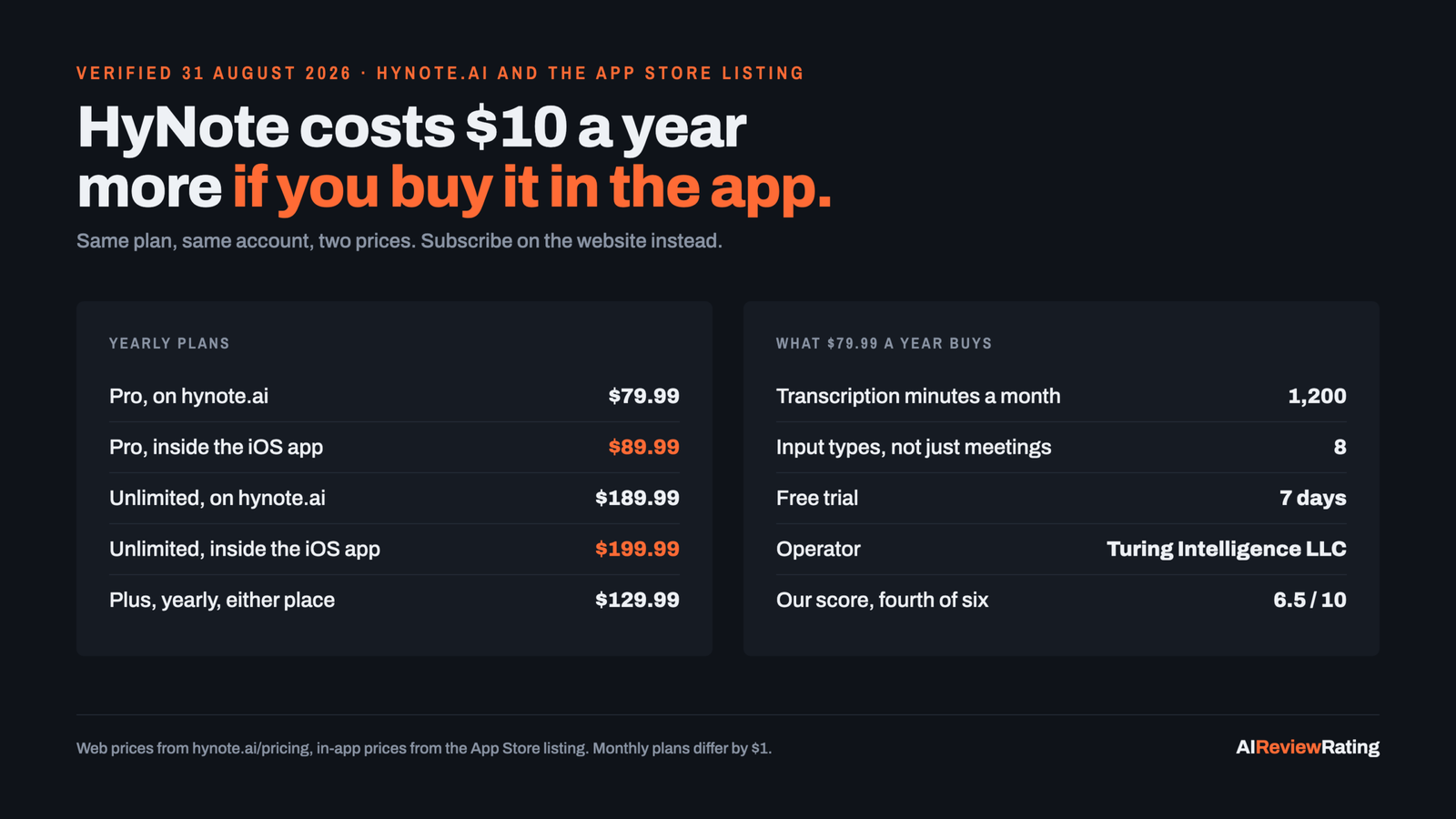
HyNote charges different prices on the web and inside its iOS app. Apple takes a cut of in-app purchases and this vendor passes it on.
| Plan | On hynote.ai | Inside the iOS app | Difference |
|---|---|---|---|
| Pro, yearly | $79.99 | $89.99 | $10 more in the app |
| Plus, yearly | $129.99 | $129.99 | None |
| Unlimited, yearly | $189.99 | $199.99 | $10 more in the app |
| Pro, monthly | $11.99 | $12.99 | $1 more in the app |
| Plus, monthly | $18.99 | $17.99 | $1 less in the app |
| Unlimited, monthly | $24.99 | $25.99 | $1 more in the app |
Ten dollars a year is not ruinous, but it is entirely avoidable, and it is the kind of thing a review should tell you. Subscribe on the website, then sign in on the phone. The one exception in our read is Plus billed monthly, which is $1 cheaper in the app; weekly plans and a $9.99 credit pack exist only in the app.
Is it good value? The comparison that matters
Three tools in this category sell exactly 1,200 transcription minutes a month, which makes them directly comparable.
| Tool | Plan with 1,200 minutes a month | A year | Per 1,000 minutes |
|---|---|---|---|
| HyNote | Pro | $79.99 | $5.55 |
| Otter.ai | Pro | $99.96 | $6.94 |
| Plaud | Pro | $99.99 | $6.94 plus a device |
HyNote is 20% cheaper than Otter for the same monthly minute allowance, and Plaud’s equivalent plan needs a recorder that starts around $159 on top. At the other end, HyNote Unlimited is $189.99 a year for unlimited real-time transcription, against $239.88 for Otter Business. This is the strongest part of the product’s case and it is a pricing argument, not a quality one.
Where it falls short
No compliance report to point to
On 30 August the homepage claimed SOC 2 Type II infrastructure and HIPAA-aligned workflows, while the dedicated security page did not. On 17 October neither phrase appears on the homepage, FAQ, security, pricing, features, integrations, compare or Mac pages. That is progress on consistency and not on assurance: the security page states AES-256 at rest and TLS 1.2 or better in transit, hosting on Google Cloud, no model training on customer content, alignment with GDPR and CCPA, and that it works with external firms on penetration testing, without naming a firm or publishing a report. It also claims end-to-end encryption and that “not even HyNote” can view your files, which we have not tested and which sits oddly beside server-side AI summaries and chat.
If you are buying for a clinic, a law firm or a finance team, ask for a current report and a signed BAA before you commit, and treat the marketing pages as claims, not evidence.
A thin developer surface, improving
The picture changed in October. HyNote now has a public changelog at hynote.ai/updates with dated entries, the newest on 12 October, and a public MCP server at hynote.ai/mcp that lets an AI assistant search and read your notes and save new text notes after an OAuth sign-in. It cannot edit or delete notes. What is still missing is a documented REST API: /docs, /developers and /status return 404, so our rubric does not count an API, and there is no status page when something breaks. Granola includes API and MCP access on a $14 plan; Otter has an API on Enterprise.
Two company names
The website is operated by Turing Intelligence LLC. The iOS app is published by Tuling Network Limited. Both are the vendor’s own records. It is worth a question if you are signing a data processing agreement.
What users say
On Apple’s App Store, HyNote holds 4.78 out of 5 from 7,646 ratings, on version 19.2, last updated 2026-10-16, read from Apple’s own listing data on 17 October 2026. On Google Play it held 4.5 from about 4,070 reviews when we read it on 31 August 2026, and we have not re-read it since. Neither figure comes from a review aggregator. HyNote’s own homepage still shows 3.8K iOS reviews, a stale number against its own store listing.
The gap between 4.8 on iOS and 4.5 on Android is the sort of thing worth noticing if you are an Android team: it is not damning, but it is consistent with the iOS app being the more finished one, and the vendor’s own marketing leads with the iOS number.
The vendor claims more than a million users and 2,000 teams. We have not been able to verify either figure independently and we are not repeating them as fact.
Who should buy it
Buy HyNote if you capture a mix of meetings, documents, videos and phone calls, you want one subscription rather than three, and you want the cheapest route to serious transcription volume: 1,200 minutes a month for $79.99 a year. Take the annual plan on the website, not monthly, and not in the app.
Do not buy it if you need a documented REST API or a compliance report today. Granola is the better laptop-meeting tool and ships an API. Otter.ai is the safer institutional purchase. Plaud is the only one that handles conversations in a room.
HyNote publishes a free plan with real recording and transcription, so the honest first step is to run a fortnight of your actual meetings through it before paying for anything.
How we test, and what we will not do
Prices come from each vendor’s own pricing page, read by hand on 30 August 2026 (HyNote again on 17 October 2026), with the page saved. App ratings come from Apple’s and Google’s own store listings. We do not take prices, ratings or review text from G2 or any other review aggregator, because republishing their compilations is both against their terms and the opposite of useful.
Scores are produced by a rubric that measures evidence, not enthusiasm: pricing clarity, free access, documentation, maintenance signals, how much we could verify, and whether there is a public API. An automated pass tops out at 8.5 out of 10. The last 1.5 points are reserved for a dated hands-on review by a named person, so none of the tools here has them. How we score.
Where a vendor’s own pages disagree with each other, we say so rather than picking the flattering one.
Questions people actually ask
Is HyNote free?
Yes, and the free plan is a real one rather than a trial. It includes audio recording and transcription, up to 120 minutes per session, the template library, file uploads, sync across web, mobile and tablet, calendar integration and private storage. No monthly transcription cap is stated on the pricing page, which is unusual enough that you should confirm it in the app before you build a workflow on it. The Mac app, released on 28 September 2026, is also free, with unlimited recording minutes and transcription on the device.
How much does HyNote cost?
Pro is $11.99 a month or $79.99 a year, Plus is $18.99 or $129.99, Unlimited is $24.99 or $189.99, and Teams is $20 a seat a month, or $180 a seat a year ($15 a month) billed yearly, from two seats. Read from the vendor’s pricing page on 17 October 2026. The one-time credits on Pro, Plus and Unlimited are halved on monthly billing.
Is HyNote worth it?
If you capture more than meetings, yes, on the arithmetic. Pro is the cheapest 1,200-minute plan of the three that publish one, and no rival on this page turns a PDF, a YouTube link and a phone call into notes from the same account. If you only record video calls on a laptop, Granola does that specific job better and its Business plan includes an API.
Does HyNote put a bot in my meeting?
No. It transcribes Zoom, Google Meet, Teams and Webex from your device, so nothing appears in the participant list. That is a genuine advantage in client work, and a problem in organisations whose policy requires a visible recording notice.
Is HyNote secure enough for regulated work?
Its security page states AES-256 at rest, TLS 1.2 or better in transit, Google Cloud hosting, no model training on customer content, third-party penetration testing with no firm named, and GDPR and CCPA alignment. It also claims end-to-end encryption, which we have not tested. In August the homepage additionally claimed SOC 2 Type II infrastructure and HIPAA-aligned workflows; on 17 October 2026 neither phrase appears on any HyNote page we read, so there is no compliance report to point to. Ask for one before you sign anything in healthcare, legal or finance.
Does HyNote have an API?
Not a documented REST API. /docs, /developers and /status return 404, checked 17 October 2026. Since 12 October there is a public MCP server at hynote.ai/mcp: after an OAuth sign-in an AI assistant can search and read your notes and save new text notes, but cannot edit or delete them. There is also a public changelog at hynote.ai/updates. If you need to pipe notes into your own systems with a REST API, Granola and Otter both publish one.
Who makes HyNote?
The website’s footer says Turing Intelligence LLC. Apple lists the iOS app’s publisher as Tuling Network Limited. Both spellings appear in the vendor’s own records, checked 17 October 2026.
What are the best HyNote alternatives?
Granola for laptop meetings, Otter.ai if you need an established vendor with SSO and an API, Plaud for in-person conversations. The full comparison is in our AI note taker ranking.
Related reading on this site
- AI note takers compared on cost per year, every note taker side by side.
- AI sales tools priced per seat, the seat-priced meeting recorders sales teams buy, Fireflies among them, against HyNote’s $79.99 a year.
- Open source alternatives to paid AI tools, the self-hosted transcription route, for anyone weighing HyNote against running a model on their own hardware.
Sources
Every price on this page was read off the vendor’s own page on 17 October 2026 (Google Play figures: 31 August 2026) and the page was kept. We do not take pricing from review aggregators.
- HyNote pricing, read 17 October 2026
- HyNote data security, read 17 October 2026
- HyNote updates feed, read 17 October 2026
- HyNote MCP setup page, read 17 October 2026
- HyNote for Mac, read 17 October 2026
- HyNote help centre
- Apple App Store listing data for HyNote, read 17 October 2026
- HyNote on Google Play, read 31 August 2026
- HyNote AI Review 2026, Daniel Davidson
- HyNote AI Review: Is It Worth the Price?, AI Jobs & Interviews
- r/AI_Agents discussion on AI note takers, 200+ comments
Comments
Sign in to join the discussion.
Login to comment