The short answer
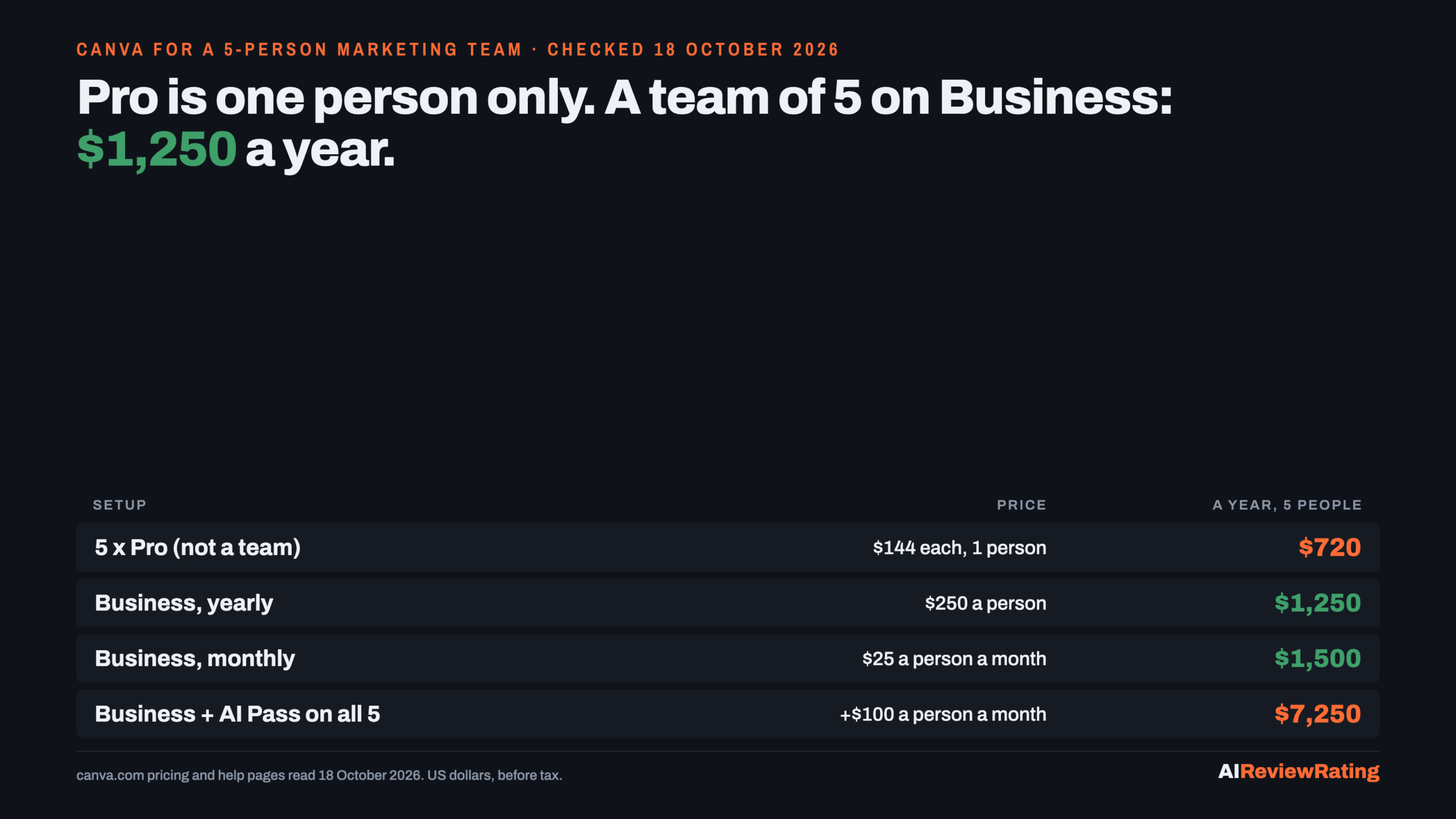
Short answer, prices read on 18 October 2026: Canva Pro is $144 a year or $18 a month for one person, and Canva says only one person can use a Pro account. A marketing team therefore lands on Business, at $250 a year or $25 a month per person: $1,250 a year for 5 people on yearly billing, $1,500 on monthly. Each Business seat gets its own AI allowance of up to 400 Premium or 40 Ultra AI uses a month by Canva’s own estimate, not pooled across the team. Past that, Canva’s AI Pass add-on is $100 per person per month. All prices are US dollars before tax.
| Plan | Billed yearly | Billed monthly, a year | Who can use it | AI a month, per person (Canva’s estimate) | Storage |
|---|---|---|---|---|---|
| Canva Free | $0 | $0 | one person | up to 20 Standard or Premium uses, no Ultra | 5GB |
| Canva Pro Our pick | $144 ($12 a month) | $216 ($18 a month) | one person only | up to 200 Premium or 20 Ultra uses | 100GB |
| Canva Business Our pick | $250 per person | $300 per person ($25 a month) | one person or a team | up to 400 Premium or 40 Ultra uses | 500GB |
| Canva Enterprise | Contact Sales | Contact Sales | large organisations | up to 400 Premium or 40 Ultra uses | 1TB |
Our pick means we earn a commission if you subscribe through our link. Canva is the only tool on this page, so the badge marks the plans we would buy at each team size below. It does not change any score: Canva scores 3 on our published rubric, printed here unchanged. See Canva plans.
Five Pro accounts are not a team
The obvious saving for a 5-person team is five Pro subscriptions: 5 x $144 = $720 a year, against $1,250 on Business. Canva closes that door in two places. Its pricing FAQ says “Only one person can use a Canva Pro account”, and its help centre says “Creating a team requires a Canva Business plan.” Five Pro accounts are five separate people, not a team, so none of Business’s team admin tools or brand approvals. The old Canva Teams plan is closed to new sign-ups; existing Teams customers keep their price, but one who cancels cannot come back to Teams.
So the real comparison is what the $530 a year ($106 per person) buys on Business over Pro: collaboration and team admin tools, 100 Brand Kits with approvals against Pro’s 5, 500GB of storage against 100GB, Flourish, 10% off print orders, and twice Pro’s AI allowance on every seat. Billing follows the people who accept an invite, adjusted monthly, or quarterly on a yearly plan, and each member’s designs stay private until they share them.
| Team size | Business, billed yearly | Business, billed monthly | Premium AI uses a month, all seats | Ultra AI uses a month, all seats |
|---|---|---|---|---|
| 1 person | $250 | $300 | up to 400 | up to 40 |
| 3 people | $750 | $900 | up to 1,200 | up to 120 |
| 5 people | $1,250 | $1,500 | up to 2,000 | up to 200 |
| 10 people | $2,500 | $3,000 | up to 4,000 | up to 400 |
For one person the gap is the same $106 a year. A solo marketer who keeps running out of Pro’s 20 Ultra uses doubles them to 40 on Business for $106 a year more, which is far less than AI Pass at $1,200 a year. Our pick for a team of 5: Business on yearly billing, $1,250 a year. Start Canva Business.
Yearly billing saves 33% on Pro, not 16%
Canva’s billing switch says “Save from 16%”. That figure is Business: $300 a year on monthly billing against $250 yearly, a saving of $50 per person (16.7%). On Pro the saving is twice as large: $216 on monthly billing against $144 yearly, $72 or 33.3%. Put the other way, a Pro user on monthly billing pays 50% more for the same plan. The page opens on yearly prices, so the monthly figures only appear after you flip the switch.
What the AI allowance is per seat
Canva sorts its AI tools into tiers. On paid plans, AI design tools such as Translate and Magic Write and all Standard AI tools do not count towards the monthly allowance, subject to fair use. Premium tools, which include Magic Layers and creating an image with Canva AI, and Ultra tools, which are conversational design with Canva AI 2.0 and creating a video clip, draw from one shared pool per person. Canva publishes the pool as ranges of uses for a simple task with the lightest tool in each tier, and warns that frequent advanced use “will typically be on the lower end”. The allowance resets monthly on your billing date, also on yearly plans.
| Plan and billing | A month | Per Premium use, at best | Per Ultra use, at best |
|---|---|---|---|
| Pro, yearly Our pick | $12 | $0.06 | $0.60 |
| Pro, monthly | $18 | $0.09 | $0.90 |
| Business, yearly Our pick | $20.83 | $0.052 | $0.52 |
| Business, monthly | $25 | $0.062 | $0.62 |
| AI Pass add-on, on top of either | $100 | $0.013 | $0.12 |
One more catch for anyone testing before buying: Canva’s help centre says trials of Pro and Business “include the same size allowance as Canva Free”, which is 20 uses. The 200 or 400 only arrive once the trial converts to a paid plan, and the trial is available once per account and once per payment method. A Business trial does let you invite the team without being billed.
AI Pass: $100 a person a month for a heavy AI user
AI Pass is a monthly add-on at USD $100 per person, sold on top of Pro or Business. Canva states its size only as a multiple: 40x more AI on Pro and 20x more on Business. Read literally, both land on the same pool, 40 x 200 = 20 x 400 = 8,000 Premium uses or 800 Ultra uses a month at the top of Canva’s range. That is our arithmetic, not a number Canva prints. If you use it all, a Premium use costs about $0.013 and an Ultra use $0.12, the lowest per-use rates on the page; if you do not, it is $1,200 a year per seat.
- Who can buy it: web-managed Pro, Teams, Business and Nonprofits plans. Not Free, Education, Enterprise, a free trial or a prepaid plan. On Business, only owners and admins buy it, per member.
- Team math: AI Pass on all 5 Business seats, yearly, is $1,250 + 5 x $1,200 = $7,250 a year. Buy it for the one or two people who hit the limit, not the whole team.
- Business alternative: AI top-ups, one-time blocks equal to the Business monthly allowance, valid 30 days, one active at a time. Canva’s help page does not print a top-up price, so we cannot compare it with AI Pass, and a manual top-up cannot be cancelled once bought.
Canva also says plainly that you do not need AI Pass to access AI features; it only raises the ceiling.
Who pays nothing
Registered nonprofits get Canva Pro features plus collaboration tools free, for one team of up to 50 users, with extra seats at 50% off Enterprise. K-12 schools also get most premium features free. Everyone else can stay on Free, which keeps 20 AI uses a month, one Brand Kit with 3 colours and 5GB of storage. For what the other free plans in a small business stack include, see A solo founder’s $0 AI stack, and where each free plan stops.
Plan changes that cost money
- Pro to Business and back: switching takes effect at once and bills at the Business rate from the next billing date. Canva says that if you then cancel Business, your original Pro plan is not automatically reinstated; you resubscribe at the price on the page that day.
- Leaving Teams: a legacy Teams customer keeps the old price, including for new members. Cancel, and Teams is gone for good.
- Tax: every price on the page excludes tax, which Canva calculates from your billing details.
Where search results get Canva’s prices wrong
We captured Google’s AI Overview and AI Mode for “canva pricing” on 18 October 2026 and checked what their cited pages say against canva.com the same day.
| Search result says | canva.com says |
|---|---|
| A page cited in Google’s AI Overview: Pro is US$18 a month or US$180 a year | Pro is $144 a year, $18 a month |
| A page cited in AI Mode, titled for 2025: Canva Pro costs $120 per year | Pro is $144 a year |
| A YouTube video cited in AI Mode: Business $25 per user a month or $250 a year | Correct: $25 a month or $250 a year per person |
| The AI Overview cites Canva’s India page, which lists a Pro Lite plan | The US page lists Free, Pro, Business and Enterprise only; Canva Help gives Pro Lite a Free-size AI allowance |
The tool on this page
Canva Our pick
Online design suite. Free, Pro $144 a year for one person, Business $250 a year per person, Enterprise by quote. Business is the plan that makes a team, with per-member AI allowances of up to 400 Premium or 40 Ultra uses a month. For what Canva costs per product photo against dedicated tools, see AI product photography: what 500 listing photos cost a month; for per-image prices across image generators, see AI image generators for marketing teams: what one image costs. Try Canva.
How we checked
Every price and allowance on this page was read on 18 October 2026 in a rendered browser on Canva’s own pages: the pricing page in its default yearly state and with the billing switch flipped to monthly, and five Canva Help articles on AI usage, AI Pass, top-ups and upgrading. Cost per AI use and team totals are our arithmetic on those figures. We did not buy a plan or run Canva’s AI tools against the allowance, so the per-use figures are ceilings from Canva’s own estimates, not measured counts. Adobe Express was not compared: its pricing page returned an error to our browser.
Questions people ask about Canva pricing
How much does Canva Pro cost in 2026?
$144 a year or $18 a month for one person, before tax, read on canva.com on 18 October 2026. Monthly billing comes to $216 a year.
How much is Canva Business per person?
$250 a year or $25 a month per person. A 5-person team pays $1,250 a year on yearly billing or $1,500 on monthly.
Can a team share one Canva Pro account?
No. Canva says only one person can use a Canva Pro account, and creating a team requires a Canva Business plan.
Why is Canva Pro so expensive now?
Canva’s pages do not give a reason. What they show on 18 October 2026 is $144 a year, so pages quoting $120 a year are out of date, and monthly billing costs 50% more than yearly ($216).
How many AI uses do I get on Canva Pro?
Canva estimates up to 200 Premium AI uses or 20 Ultra AI uses a month, for simple tasks. Business doubles that to 400 or 40 per person. Trials get the Free size, 20 uses.
How much is Canva AI Pass?
USD $100 per person per month, as an add-on to Pro, Teams, Business or Nonprofits. It is not sold on Free, Education, Enterprise, trials or prepaid plans.
Is Canva free for nonprofits?
Yes for registered nonprofits: Canva Pro features plus collaboration tools for one team of up to 50 users, with extra seats at 50% off Enterprise.
Related reading
- A solo founder’s $0 AI stack, and where each free plan stops
- AI product photography: what 500 listing photos cost a month
- AI image generators for marketing teams: what one image costs
- AI writing tools priced for a 5-person marketing team
Sources
- Canva, Plans and pricing (both billing states), read 18 October 2026.
- Canva Help, Understanding your AI usage, read 18 October 2026.
- Canva Help, Understanding AI Pass, read 18 October 2026.
- Canva, AI Pass, read 18 October 2026.
- Canva Help, Understanding AI top-ups, read 18 October 2026.
- Canva Help, Upgrading to Canva Pro or Canva Business, read 18 October 2026.
- Canva, Canva Business, read 18 October 2026.
- Canva, Canva for Nonprofits, read 18 October 2026.
- Google AI Overview and AI Mode for “canva pricing”, our capture, 18 October 2026.
Comments
Sign in to join the discussion.
Login to comment