Prices verified 10 October 2026 on each vendor’s own pricing page, with the billing toggle read both ways and no promotion applied. Totals are our arithmetic on those list prices, in US dollars, before tax.
Our pick means we earn a commission if you subscribe through our link. OpusClip is our pick on this page. That does not change any score: OpusClip scores 3.5 on our published rubric, below Klap at 6.2 and Descript at 4.7, and every score below is printed unchanged.
The short answer
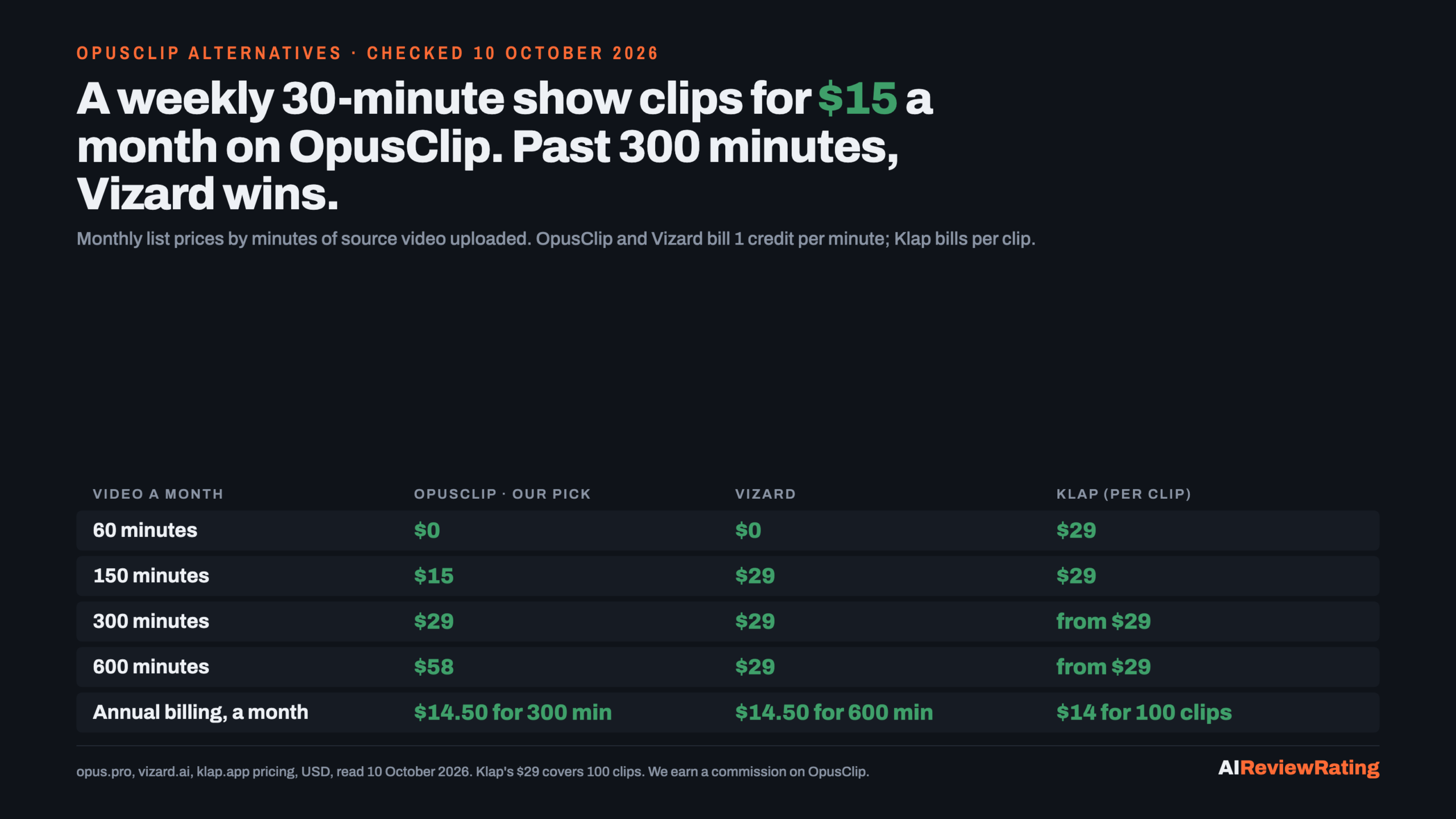
For a solo creator or podcaster who clips one 30-minute episode a week and pays month to month, OpusClip Our pick Starter is the smallest bill of the four tools we priced: $15 a month for 150 minutes of source video, with the watermark removed. Vizard Creator and Klap Basic both start at $29, and Descript Hobbyist at $24. Staying on OpusClip Starter instead of moving to Vizard or Klap keeps $14 a month, $168 a year.
Past 150 minutes the answer flips, and you should know it before you renew. Vizard Creator includes 600 minutes for $29 a month, where OpusClip Pro includes 300 for the same $29. At 600 minutes a month OpusClip costs $58 and Vizard $29. On annual billing the two cost the same $14.50 a month, and Vizard still includes twice the minutes. If you upload more than about 5 hours of long video a month, Vizard is the cheaper per-minute clipper.
Try OpusClip free (60 minutes a month)
| Source video a month | OpusClip Our pick | Vizard | Klap | Descript |
|---|---|---|---|---|
| 60 minutes | $0 (Free, watermark, export within 3 days) | $0 (Free, 720p export) | $29 (no free plan listed) | $0 (Free, 60 media minutes) |
| 150 minutes | $15 (Starter) | $29 (Creator) | $29 (Basic, up to 100 clips) | $24 (Hobbyist) |
| 300 minutes | $29 (Pro) | $29 (Creator) | from $29, by clip count | $24 (Hobbyist) |
| 600 minutes | $58 (Pro, 2 packs) | $29 (Creator) | from $29, by clip count | $24 (Hobbyist) |
| Annual billing, per month | $14.50 for 300 minutes | $14.50 for 600 minutes | $14 for 100 clips | $16 for 600 media minutes |
| Our score | 3.5 | not scored | 6.2 | 4.7 |
How each tool meters your video
OpusClip charges 1 credit per minute of the original video you import, whatever number of clips comes back. A video under a minute rounds up to 1 credit, and partial minutes round down, so a 30.5-minute episode costs 30 credits. You can process only part of a long video to save credits. Posting a clip to X costs 3 more credits per account.
Vizard uses the same rule, stated on its pricing page: 1 credit equals 1 minute of video, and every minute you upload costs 1 credit.
Klap charges per clip generated, not per minute uploaded: its page says you only pay for clips you generate. Basic covers 100 clips a month, Pro 300 and Pro+ 1,000. A creator who keeps few clips from long videos gets more source time per dollar on Klap; one who wants many clips from short videos gets less.
Descript sells media hours for its text-based editor (10 a month on Hobbyist) and AI credits (400 a month on Hobbyist) for tools that include creating clips and highlights. It does not publish how many credits one clip run uses, so we cannot price its clips per minute.
OpusClip Our pick: $15 for a weekly show
Verified pricing (10 October 2026): Free is $0 for 60 credits a month, exports up to 1080p with auto reframe and AI captions, carries a watermark, allows no editing, and its clips stop being exportable after 3 days. Starter is $15 a month, billed monthly only, for 150 credits, with the virality score, animated captions in 20+ languages, auto posting to YouTube Shorts, TikTok and Instagram Reels, the editor, filler and silence removal and no watermark; unused Starter credits roll over for one more month. Pro is $29 a month or $174 a year for 300 credits. Unused Pro credits roll over for 1 month on monthly billing and 2 months on annual billing. Pro also adds a 2-seat team workspace, AI B-roll, export to Premiere Pro and DaVinci Resolve, 1:1 and 16:9 as well as 9:16, and a scheduler. Extra Pro packs scale in steps of 300 credits: 600 credits are $58 a month, 1,200 are $116.
Watch for: Starter outputs 9:16 only. If you pay annually, Pro at $14.50 a month costs less than Starter’s $15 and doubles the minutes, so Starter only makes sense month to month. Above 300 minutes, each extra 300 costs another $29 on monthly billing.
Verdict: the smallest no-watermark monthly bill here for up to 150 minutes, which covers four or five 30-minute episodes. Our score is 3.5, so treat this as a price pick for that workload. Full review: OpusClip review and pricing. Start on OpusClip’s free plan.
Vizard: twice the minutes for $29
Vizard Free gives 60 credits a month with AI clips, the full editor, 720p export, 3-day storage, uploads up to 60 minutes and exports up to 10 minutes. Creator is $29 a month with 600 credits, or $174 a year with 7,200 credits, and its page lists no watermark, 4K export, 100 GB of storage and 6 connected social accounts. Business is $39 a month or $234 a year, adds a shared workspace, a brand kit and 20 social accounts, and charges $5 a month per extra team seat. Vizard has no page on this site yet, so we give it no score. It is the cheaper meter for anyone above 300 minutes a month.
Klap: pay per clip, not per minute
Klap Basic is $29 a month or $14 billed yearly for 100 clips; Pro is $79 or $39 for 300 clips; Pro+ is $189 or $94 for 1,000 clips. Every plan includes AI clipping, unlimited social accounts and analytics, and the page lists no free plan. It suits long videos from which you keep a handful of clips. Score 6.2.
Descript: when you also edit the full episode
Descript is a text-based video editor first. Free includes 60 media minutes and 100 AI credits once. Hobbyist is $24 a month or $16 annually with 10 media hours, 400 AI credits a month and watermark-free 1080p export. Creator is $35 or $24 with 30 hours, 800 credits and 4K. Business is $65 or $50 with 40 hours and 1,500 credits. It is the better buy if you edit the long episode as well as cut clips, but its clip credits are not priced per minute. Score 4.7.
Which one for which creator
- One 30-minute episode a week, paying monthly: OpusClip Starter, $15. Try OpusClip.
- More than 5 hours of long video a month: Vizard Creator, 600 minutes for $29.
- Long streams or webinars where you keep only a few clips: Klap Basic, 100 clips for $29.
- You edit the whole episode in the same tool: Descript Hobbyist, $24.
- Testing before paying: OpusClip Free or Vizard Free, 60 minutes a month each.
For the wider field of AI video tools, see our AI video generator comparison.
How we checked
We read each pricing page on 10 October 2026 in a rendered browser and saved what it showed. On OpusClip we operated the Pro pack selector at 1, 2 and 4 packs and read the monthly price beside each annual one; its credit rule comes from its help center. On 11 October we switched OpusClip’s billing control and read the credit rollover for each cycle. On Vizard we switched its billing control and read the credit allowance for each cycle. Descript draws its prices as animated digits, so we confirmed the monthly figures from a screenshot. Higher Vizard credit tiers, and whether the free plans of Vizard and Descript add a watermark, were not stated plainly enough to use. The scenario totals are our arithmetic; we did not compare clip quality for this article. Scores are our published rubric’s numbers, unchanged.
Related reading on this site
- AI video generators compared: generation tools, prices and credit math.
Questions people ask about OpusClip alternatives
Is there a free alternative to OpusClip?
Vizard Free gives 60 minutes a month with 720p export and 3-day storage, the same 60 minutes OpusClip Free gives. Descript Free includes 60 media minutes and 100 AI credits once. Klap lists no free plan. Checked 10 October 2026.
Which OpusClip alternative has no watermark?
Paid plans. The plans whose pages describe watermark-free output start at $15 a month on OpusClip Starter, $24 on Descript Hobbyist and $29 on Vizard Creator. OpusClip Free carries a watermark.
Is Vizard cheaper than OpusClip?
Per minute, yes: Vizard Creator includes 600 minutes for $29 a month, OpusClip Pro 300 for $29. For 150 minutes or fewer on monthly billing, OpusClip Starter at $15 is the smaller bill.
How do OpusClip credits work?
1 credit per minute of the original video you import. A video under a minute costs 1 credit, partial minutes round down, and posting a clip to X costs 3 credits per account.
OpusClip vs Descript: which should I use?
OpusClip if you only want short clips from long videos: $15 for 150 minutes. Descript if you edit the full episode too: $24 for 10 media hours, with clip tools that use AI credits.
OpusClip vs Klap: what is the difference?
OpusClip charges per minute of video uploaded; Klap charges per clip generated, 100 clips for $29 a month. Few clips from long videos favors Klap; many clips from short videos favors OpusClip.
Do OpusClip credits roll over?
On paid plans, yes. Starter’s unused credits roll over for one more month. Pro’s roll over for 1 month on monthly billing and 2 months on annual billing. The Free plan states no rollover. Read on OpusClip’s pricing page 11 October 2026.
Sources
- OpusClip pricing, read 10 and 11 October 2026.
- OpusClip help center: how credits work, read 10 October 2026.
- Vizard pricing, read 10 October 2026.
- Klap pricing, read 10 October 2026.
- Descript pricing, read 10 October 2026.
- Reddit threads asking for OpusClip alternatives: r/VideoEditingTips, r/NewTubers, r/podcasting.

Comments
Sign in to join the discussion.
Login to comment