
Our verdict
OpusClip review and pricing, read from opus.pro/pricing on 7 November 2026: OpusClip cuts one long video into short clips with captions, auto reframing and a virality score. The Free plan gives 60 credits a month with a watermark and no editing, and exports expire after 3 days. Starter is $15 a month (150 credits, monthly billing only). Pro is $29 a month, or $14.50 a month billed yearly ($174 for 3,600 credits), and adds the scheduler, AI B-roll, multiple aspect ratios and limited API access. Business is custom priced. Our link applies OpusClip’s 40% off code to your first Pro month.
Try OpusClip We earn a commission if you sign up through this link. It never affects our ratings.
Reviewed by AI Review Rating desk review against the published rubric How we score
Pricing
| Tier | Monthly | Includes | Seats |
|---|---|---|---|
| Free | Free | 60 credits a month, clips up to 1080p with a watermark, no editing; per the page, clips stop being exportable after 3 days | 1 |
| Starter | $15 | 150 credits a month. $15 billed monthly; the page says Starter is only available monthly. Watermark removal, 1 brand template, text and timeline editing, filler and silence removal, auto post to YouTube Shorts, TikTok and Instagram Reels, free trial with no card | 1 |
| Pro | $29 | 300 credits a month at 1 credit pack (1 to 15 packs). $29 billed monthly, or $14.50 a month billed yearly ($174 a year for 3,600 credits). Unused credits roll over 2 months on yearly billing. Adds scheduler, AI B-roll, 9:16, 1:1 and 16:9, Premiere Pro and DaVinci Resolve export, limited API access; 2 team seats, free trial with no card | 2 |
| Business | Custom | Custom pricing and credit packs, priority processing, API and custom integrations, dedicated storage, MSA, dedicated Slack support, contact sales | custom |
On video
What users actually say
We link to discussions rather than reproducing them. Opinions belong to their authors.
User reviews
No one has reviewed OpusClip here yet. Reviews are moderated before they appear, and our own score is editorial and separate from user ratings, though once reviews land they do lift it.
Used OpusClip? Review it.
Sign in to rate it. One account, one review per tool, so the score means something.
Requiring an account is how we keep this page free of drive-by spam. We never sell your address.
OpusClip alternatives
 reap video
AI video editor that turns long videos, webinars, and…
🥈
 Klap
Klap turns long videos, podcasts and webinars into ready-to-post…
🥉
 Saya
Summarize any podcast, youtube video, or article in seconds…
 PixVerse
Proprietary AI research in video generation and production, extended…
 AutoReels
Create captivating faceless videos in minutes with AI. Choose…
 Cliplama
Describe a video with text and turn your ideas…
Side by side
Articles on OpusClip
All articles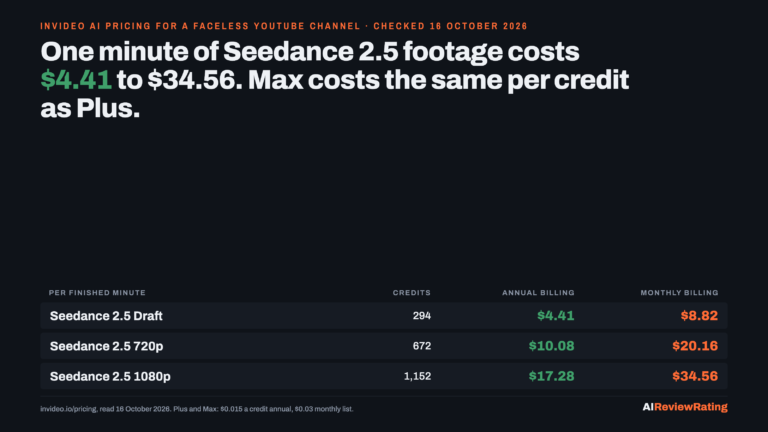 InVideo AI Pricing in 2026: A Faceless YouTube Channel Pays $4.41 to $34.56 for Each Minute of Seedance 2.5 Footage, and Max Costs the Same per Credit as Plus
InVideo Starter, Plus and Max priced per credit and per minute of generated footage for a faceless YouTube channel, against…
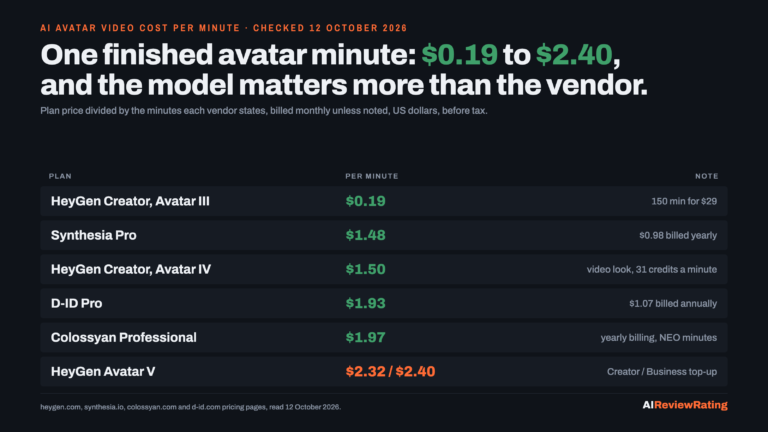 AI Avatar Video Cost Per Minute in 2026: $0.19 to $2.40 a Minute on HeyGen, Synthesia, Colossyan and D-ID, and 60 Finished Minutes a Month Costs a Training Team $29 to $219
Plan price divided by the minutes each vendor states, billed monthly: HeyGen $0.19 (Avatar III) to $2.32 (Avatar V), Synthesia…
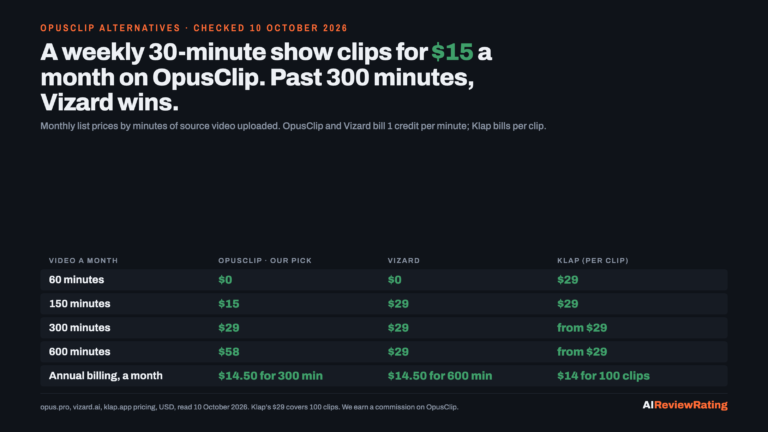 OpusClip Alternatives in 2026: A Creator Clipping a Weekly 30-Minute Show Pays $15 a Month on OpusClip, Against $24 to $29 Elsewhere; Past 300 Minutes, Vizard’s $29 Buys Twice the Minutes
A weekly 30-minute show clips for $15 a month on OpusClip Starter; Vizard and Klap start at $29, Descript at…
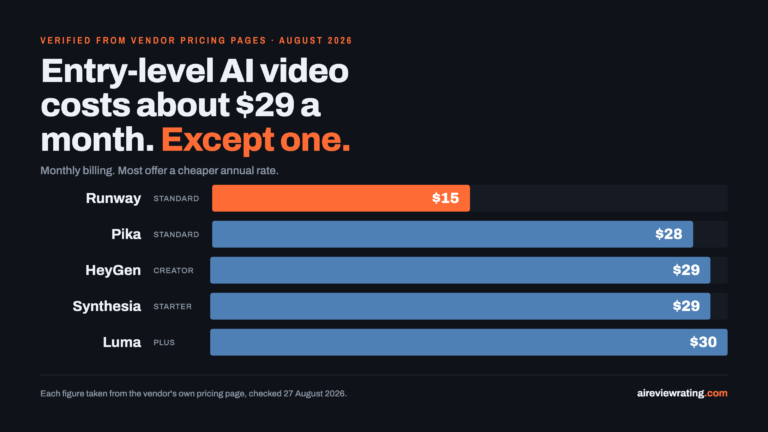 Best AI Video Generator in 2026: What It Actually Costs Per Usable Shot
Short answer, as of August 2026: there is no single best AI video generator, but there is a cheapest way…
Questions
How much does OpusClip cost?
On 7 November 2026 OpusClip’s pricing page listed Free at $0 (60 credits a month), Starter at $15 a month (150 credits, monthly billing only) and Pro at $29 a month, or $14.50 a month billed yearly ($174 a year for 3,600 credits over 12 months). Business is custom priced. Pro credit packs go from 1 to 15 packs, and the page says to contact OpusClip for more. Our link applies OpusClip’s 40% off code to your first Pro month.
Is OpusClip free?
Yes. OpusClip’s Free plan costs $0 and gives 60 credits a month with no credit card required. Exports carry a watermark, there is no editing, and per the page clips stop being exportable after 3 days. Starter and above remove the watermark.
How many credits do OpusClip plans include?
Free includes 60 credits a month, Starter 150 and Pro 300 at one credit pack. On yearly Pro billing the page shows 3,600 credits over 12 months, and unused credits roll over for 2 months. Business credits are custom.
Does OpusClip have a watermark?
On the Free plan, yes: the pricing page lists a watermark and no editing. The Starter plan lists Remove Watermark, and Pro and Business include it too.
What does OpusClip Pro add over Starter?
Per the pricing page, Pro adds Viral Hook, motion graphics, AI B-roll (image, video and stock), input from more than 10 sources, export to Adobe Premiere Pro and DaVinci Resolve, 9:16, 1:1 and 16:9 aspect ratios, a social media scheduler, on-demand credit top-ups, custom fonts, speech enhancement, video dubbing, 2 team seats and limited API access.
Does OpusClip have an API or developer docs?
Yes. OpusClip’s API page lists a self-serve free tier, a Business plan, SDKs for Node, Python, Go, PHP, Ruby and Java, and a Bearer-token endpoint to create clipping projects. It also offers an MCP server. The pricing page lists limited API access on Pro.
What are the alternatives to OpusClip?
Our OpusClip alternatives article compares pricing for a weekly 30-minute show. If you need new footage rather than clips of footage you already own, see our best AI video generator guide.
How is OpusClip scored here?
OpusClip scores 3.5 out of 10. That comes from a desk review of public evidence, which is capped at 8.5 out of 10: public pricing, documentation, maintenance signals and how much we could actually verify. Affiliate relationships are excluded from scoring entirely. The full rubric is published on our methodology page.