Prices read 5 November 2026 on invideo.io/pricing, with MoneyPrinterTurbo’s README and GitHub repository data read the same day, US dollars per seat per month, before tax. Where a figure is arithmetic on list prices, we say so.
Our pick means we earn a commission if you subscribe through our link. InVideo is our pick on this page. That does not change any score: InVideo scores 5.2 and MoneyPrinterTurbo scores 7.8 on our published rubric, read 5 November 2026, and MoneyPrinterTurbo is not a partner.
The short answer
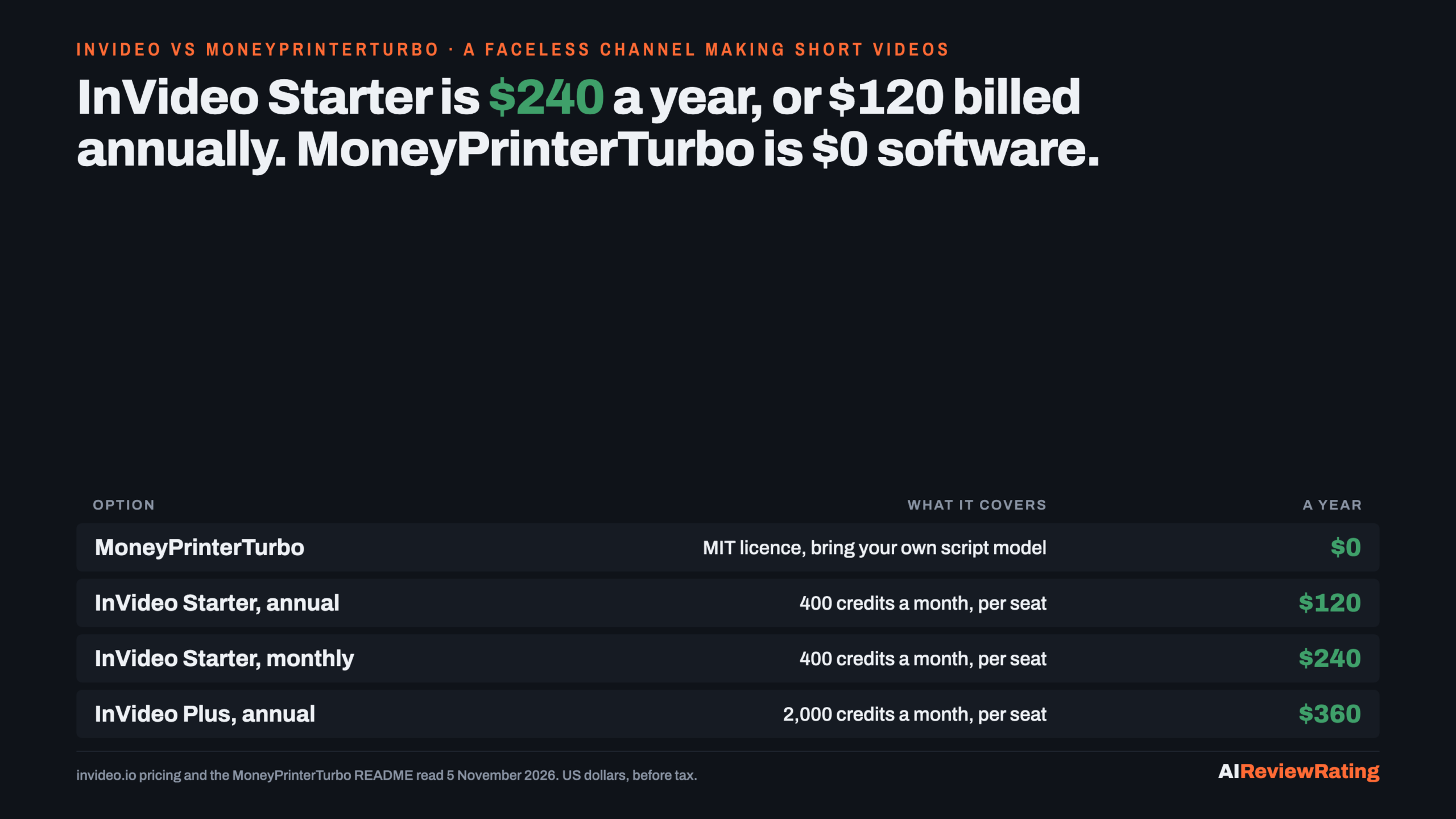
For a faceless-channel creator who wants short videos made from a topic, InVideo Our pick Starter is $20 a seat monthly or $10 billed annually, which is $240 or $120 over a year. MoneyPrinterTurbo is free, MIT-licensed software that turns a topic or keyword into a script, voiceover, footage, subtitles and music, so its software line is $0. The saving is real only if you can run Python tools yourself and are happy paying for a script model by usage.
InVideo sells a hosted editor with a credit meter. MoneyPrinterTurbo is a program you install on your own machine, and you bring the keys. Neither page prints a cost per finished video, so we price the plans and name the cost drivers instead of inventing a per-video figure. See InVideo’s plans
| Option | Billed monthly | Billed annually (per month) | What the page lists |
|---|---|---|---|
| InVideo Starter Our pick | $20 | $10 | 400 credits a month, up to 5 seats, timeline editor, Agent Two Lite, Seedance 2.0 Fast and Mini only, 200 GB storage |
| InVideo Plus Our pick | $60 | $30 | 2,000 credits a month, up to 10 seats, Agent Two Lite, Pro and Ultra, Seedance 2.5 (1080p) and 2.0 (4K), 600 GB storage |
| MoneyPrinterTurbo | $0 software | $0 software | Topic to finished video, 9:16, 16:9 or 1:1, free Edge TTS voice, free Pexels and Pixabay stock via your own keys, your own script model |
How each tool charges
InVideo sells credits per seat. Its page says unused credits do not roll over to the next month, and the Starter plan is limited to the cheaper Seedance 2.0 Fast and Mini models while Plus opens Seedance 2.5 and the full 2.0 models. We do not quote credits per video here: the pricing page does not print one, and our earlier credit-per-minute read of 16 October 2026 used a Max plan that the page lists differently on 5 November 2026, so we have not reused it. Our InVideo pricing guide has that history.
MoneyPrinterTurbo has no price. Its README lists the parts you supply: a script model from a provider such as OpenAI, Claude, Gemini or DeepSeek (or a ChatGPT subscription through its Codex route), stock footage from Pexels and Pixabay, which it labels free, or your own clips, and a voice. Edge TTS is marked free with no API key. Paid voices and AI video models are optional add-ons billed by their own providers, and we have not priced them.
What running it yourself involves
- Setup: the README asks for Python 3.11 or later and offers a Windows one-click package, a pip package named mpt, Docker and a Google Colab notebook.
- Hardware: the README lists 4 CPU cores and 4 GB of RAM as the minimum and says a GPU is not required.
- Output: 1080 by 1920 portrait, 1920 by 1080 landscape or 1080 by 1080 square, with subtitle styling and background music.
- Publishing: the README lists direct publishing to TikTok, Instagram and YouTube Shorts.
- Editing: InVideo lists a full timeline editor on every paid plan. The MoneyPrinterTurbo README describes control over each stage, with no timeline editor named.
Is MoneyPrinterTurbo maintained?
On 5 November 2026 the GitHub API showed 139,836 stars, an MIT licence, a last push on 5 November 2026 and v1.3.9 as the most recent release, published 21 October 2026. Those are repository facts, not a quality verdict. Our MoneyPrinterTurbo page reports an older star count from an earlier read.
Who should pick which
- A creator who wants a hosted editor and AI footage models behind one login: InVideo Starter at $20 monthly or $10 annually, moving to Plus at $60 or $30 for the full Seedance models.
- A creator who can run Python and wants a $0 software line: MoneyPrinterTurbo, with the script model as the only cost you must plan for.
- A team of up to 5 sharing one workspace: InVideo Starter, which lists up to 5 seats.
- A batch of topic-to-Short videos on your own computer: MoneyPrinterTurbo, which lists batch generation.
- A creator unsure either works for them: try MoneyPrinterTurbo first at $0, then InVideo if the setup costs more of your time than $120 a year.
How we checked
We read InVideo’s pricing page in a rendered browser on 5 November 2026, and MoneyPrinterTurbo’s README and repository data from GitHub the same day. We did not run MoneyPrinterTurbo or generate a video in either tool for this page, so we make no claim about video quality, render time or credits per video. Scores are our published rubric’s numbers, unchanged. For other free options, see our open-source alternatives guide.
Questions people ask about InVideo and MoneyPrinterTurbo
Is MoneyPrinterTurbo free?
The software is free under the MIT licence. You supply your own script model, and its README lists free Edge TTS voices and free Pexels and Pixabay stock footage keys. Paid providers are optional.
How much is InVideo?
Starter is $20 a seat monthly or $10 billed annually, and Plus is $60 or $30, read on invideo.io/pricing on 5 November 2026.
Does MoneyPrinterTurbo need a GPU?
No. Its README says a GPU is not required, with 4 CPU cores and 4 GB of RAM as the minimum.
Can MoneyPrinterTurbo post to YouTube Shorts?
Its README lists direct publishing to TikTok, Instagram and YouTube Shorts.
Do InVideo credits roll over?
No. InVideo’s pricing page says unused credits do not roll over to the next month.
Sources
- InVideo pricing, read 5 November 2026.
- MoneyPrinterTurbo on GitHub, README and repository data, read 5 November 2026.
Comments
Sign in to join the discussion.
Login to comment