Prices read 5 November 2026 on opus.pro/pricing and kapwing.com/pricing, with the OpusClip and Kapwing help centers and Kapwing’s Repurpose Studio page, US dollars per month, before tax. Totals are our arithmetic on list prices, and the monthly and annual views of Kapwing were read separately.
Our pick means we earn a commission if you subscribe through our link. OpusClip is our pick on this page. That does not change any score: OpusClip scores 3.5 and Kapwing scores 7.7 on our published rubric, read 5 November 2026, and Kapwing is not a partner.
The short answer
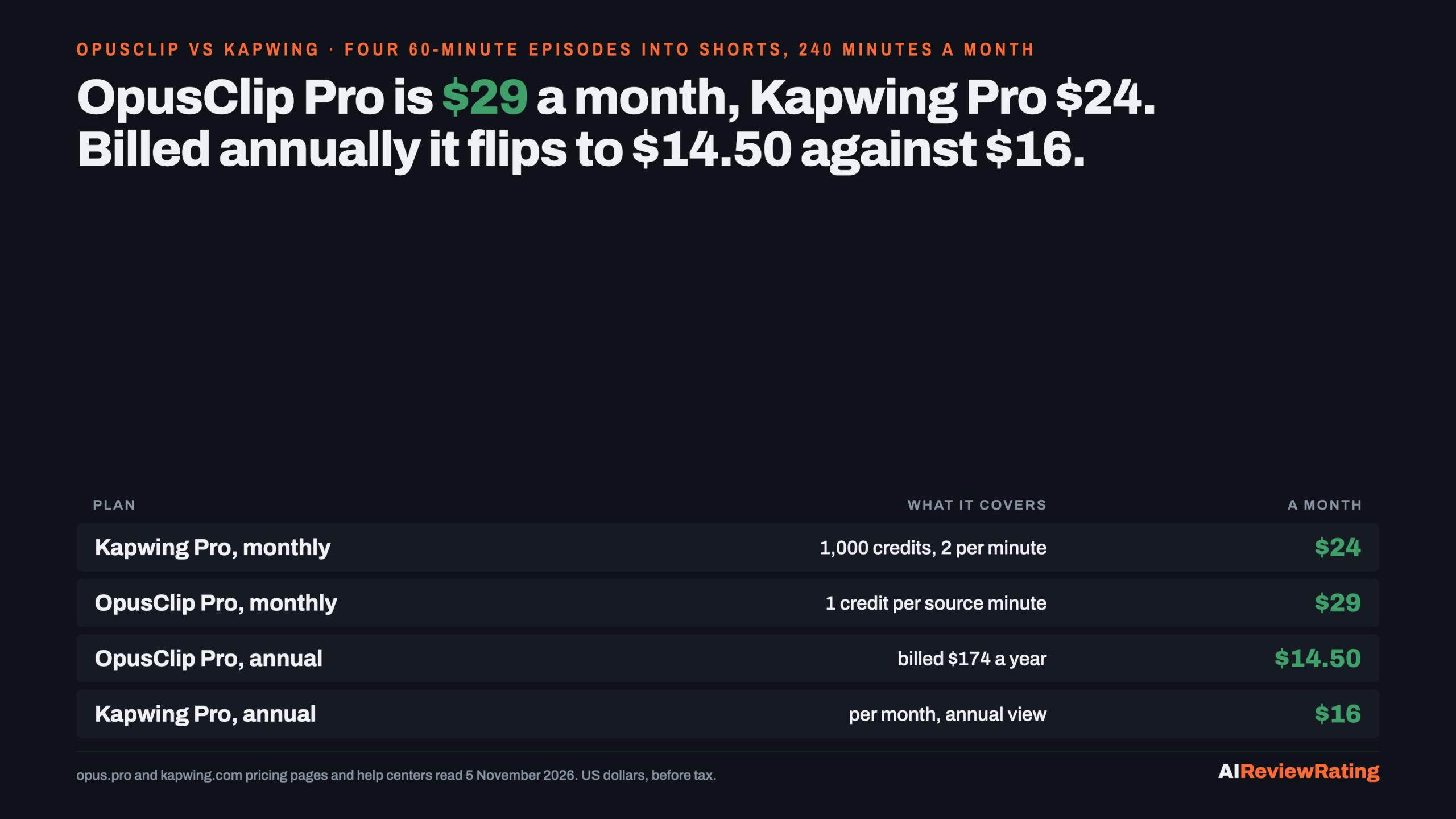
For a podcaster who cuts four 60-minute episodes a month into Shorts, that is 240 minutes of source video. OpusClip Our pick Pro is $29 a month, or $14.50 a month billed as $174 a year, and its help center charges 1 credit per minute of imported video, so 240 credits fit inside Pro’s 300 a month. Kapwing Pro is $24 a month, or $16 a month on the annual view, and prices Repurpose Studio at 2 credits a minute, so the same job is 480 of its 1,000 credits.
So Kapwing is $5 cheaper on a monthly bill and OpusClip is $1.50 cheaper billed annually. The choice is really about what each plan wraps around the clipping. OpusClip Starter, $15 monthly, adds a virality score and auto-posting to YouTube Shorts, TikTok and Instagram Reels, but its 150 credits cover only 150 source minutes. Kapwing is a full video editor, and its credits are shared with subtitles, dubbing and other tools. Try OpusClip’s free plan (60 credits a month) Our link applies OpusClip’s 40% off code to your first Pro month.
| Plan | Monthly billing | Annual billing (per month) | What the page allows a month |
|---|---|---|---|
| OpusClip Free Our pick | $0 | n/a | 60 credits, up to 1080p, watermark, no editing, clips not exportable after 3 days |
| OpusClip Starter Our pick | $15 | not sold annually | 150 credits, virality score, no watermark, 9:16 only |
| OpusClip Pro Our pick | $29 | $14.50 ($174 a year) | 3,600 credits over 12 months on the annual plan (300 a month by our arithmetic), 2 seats, 9:16, 1:1 and 16:9 |
| Kapwing Free | $0 | n/a | 10 credits, watermark on every export, 720p, exports up to 4 minutes |
| Kapwing Pro | $24 | $16 | 1,000 credits, no watermark, 4K, exports up to 120 minutes, 200 GB storage |
| Kapwing Business | $64 | $50 | 4,000 credits, 800 GB storage, option to buy 500-credit packs for $50 |
How each tool meters a clip job
OpusClip spends 1 credit per minute of the original video you import, whatever number of clips come back. Its help center says a video under one minute rounds up to 1 credit and partial minutes round down. Posting a clip to X costs 3 credits per clip per X account. You can process only part of a long video with a timeframe slider, which saves credits. Per the help center, monthly-plan credits expire in 60 days, so they roll over one extra month.
Kapwing meters everything in one credit pool. Its help center prices Repurpose Studio at 2 credits per minute, subtitle transcription at 1, subtitle translation at 2, Clean Audio at 2, Dubbing at 10 per 30 seconds and Lip Sync at 30 per minute. Every tool costs at least 1 credit. That page does not say whether the Repurpose minute counts the source or the output, so our 480-credit figure assumes the source, as OpusClip’s does.
What a month costs
- Trying it: OpusClip Free gives 60 credits every month, 60 source minutes. Kapwing Free gives 10 credits, which is 5 Repurpose minutes by the help center’s rate, and its page caps Free exports at 4 minutes.
- Four hour-long episodes: OpusClip Starter’s 150 credits fall 90 minutes short. OpusClip Pro uses 240 of 300 credits. Kapwing Pro uses 480 of 1,000.
- Twenty hours of source a month (1,200 minutes): Kapwing needs 2,400 credits, which fits Business at $64 monthly or $50 annual. OpusClip needs 1,200 credits; its pricing page shows a pack selector on Pro and “Contact us for more credits” but prints no pack price, so we do not price that row.
- Free trial of paid plans: OpusClip lists “Start your free trial” on Starter and Pro with no card. Kapwing’s FAQ says it does not offer a free trial of its paid plans.
What else changes the choice
- Clip picking: OpusClip Starter and up list AI clipping with a virality score. Pro adds prompt-to-clip and topic search. Kapwing lets you describe the clips you want, including length and aspect ratio, and says it can find key moments in a video with no speech. We found no score named on Kapwing’s Repurpose Studio page.
- Source limits: Kapwing’s FAQ gives three hours as the maximum video length for repurposing, and its Pro upload limit is 6 GB. OpusClip lists local uploads up to 10 GB on Free and Starter and 30 GB on Pro, plus public MP4 links on Pro.
- Aspect ratios: OpusClip exports 9:16 only until Pro, which adds 1:1 and 16:9. Kapwing’s page says Repurpose Studio resizes clips for YouTube, TikTok, Instagram, Facebook and LinkedIn.
- Posting: OpusClip Starter posts to YouTube Shorts, TikTok and Instagram Reels, and Pro adds a scheduler and 6 social account connections. Kapwing’s pricing page lists no posting or scheduling row.
- Editing and extras: Kapwing Pro lists a Brand Kit, custom fonts, dubbing up to 50 minutes a month and subtitling up to 1,000 minutes. OpusClip Pro lists export to Adobe Premiere Pro and DaVinci Resolve, speech enhancement and limited API access.
Who should pick which
- A podcaster or streamer who wants clips posted to Shorts, TikTok and Reels: OpusClip, whose Starter plan lists the auto-posting.
- A team already editing, subtitling and dubbing in one workspace: Kapwing Pro at $24 monthly or $16 annually.
- An annual commitment for 240 minutes a month: OpusClip Pro at $14.50 a month.
- A month-to-month plan for the same job: Kapwing Pro at $24.
- Heavy volume, 1,200 minutes a month: Kapwing Business, since OpusClip does not print the price of extra credits.
How we checked
We read both pricing pages in a rendered browser on 5 November 2026, toggling Kapwing between monthly and annual, plus the OpusClip credits help article, Kapwing’s credits help page and its Repurpose Studio page. We did not run the same episode through both tools, so we make no claim about clip quality, clip count or processing time. Scores are our published rubric’s numbers, unchanged. For other options, see our OpusClip alternatives guide.
Questions people ask about OpusClip and Kapwing
Is Kapwing cheaper than OpusClip?
On monthly billing, yes: Kapwing Pro is $24 and OpusClip Pro is $29. On annual billing OpusClip Pro is $14.50 a month against Kapwing’s $16, read 5 November 2026.
Does Kapwing turn long videos into short clips?
Yes. Its Repurpose Studio takes an uploaded video or a pasted link, up to three hours per its FAQ, and generates clips from a prompt describing their length and topic.
Does OpusClip have a free plan?
Yes: 60 credits a month, up to 1080p, with a watermark and no editing, and clips stop being exportable after 3 days.
How many credits does OpusClip use for a one-hour video?
60 credits, at 1 credit per minute of the video you import.
Does Kapwing add a watermark?
On the Free plan, yes, on every export, Repurpose Studio included. Pro and Business exports carry none.
Sources
- OpusClip pricing, read 5 November 2026.
- OpusClip help center: how credits are consumed, read 5 November 2026.
- Kapwing pricing, read 5 November 2026.
- Kapwing help center: how credits work, read 5 November 2026.
- Kapwing Repurpose Studio, read 5 November 2026.

Comments
Sign in to join the discussion.
Login to comment