The short answer
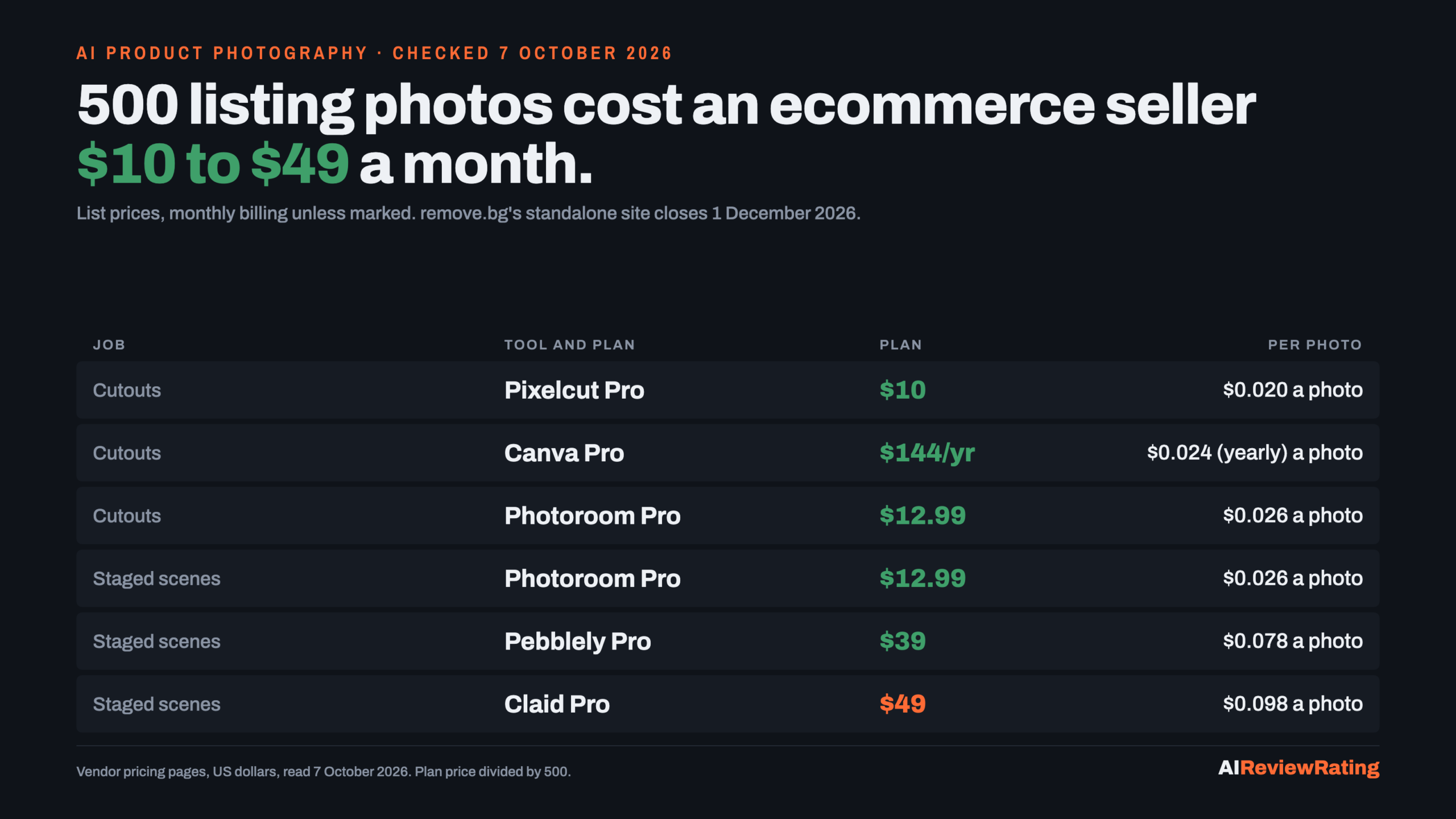
Short answer, checked on 7 October 2026: an ecommerce seller who needs 500 listing photos a month pays $10 to $49 a month for AI product photography, depending on the job. Cutting the background out of 500 product shots costs $10 a month on Pixelcut Pro, $12.99 on Photoroom Pro or $15 on Claid Essentials billed monthly, and $144 a year ($12 a month) on Canva Pro. Generating 500 staged scenes (the product placed in a new setting) costs $12.99 on Photoroom Pro, $39 on Pebblely Pro and $49 on Claid Pro. If your workflow runs on remove.bg, its standalone site closes on 1 December 2026 and its own help page names Canva as the replacement.
Our pick means we earn a commission if you subscribe through our link, and we list those tools first. Canva is our pick on this page. That does not change any score: Canva scores 3.0 and Photoroom 6.2 on our published rubric, and the cost tables below are ordered by price, not by pick. The prices are the vendors’ own.
| Job, 500 photos a month | Tool and plan | Monthly billing | Billed yearly, per month | Per photo, monthly |
|---|---|---|---|---|
| Background removal | Pixelcut Pro | $10 | $8 | $0.020 |
| Background removal | Canva Pro | $18 | $12 | $0.024 (yearly) |
| Background removal | Photoroom Pro | $12.99 | $7.50 | $0.026 |
| Background removal | Claid Essentials | $15 | $9 | $0.030 |
| AI-staged scene | Photoroom Pro | $12.99 | $7.50 | $0.026 |
| AI-staged scene | Pebblely Pro | $39 | Not shown | $0.078 |
| AI-staged scene | Claid Pro | $49 | $35 | $0.098 |
remove.bg closes on 1 December 2026: what to move to
remove.bg’s pricing and help pages carry the same banner: the standalone website will no longer be available from 1 December 2026 at 9:00am CET. remove.bg became part of Canva in 2021, and its FAQ says background removal is moving into the Canva platform, while API access moves to Leonardo.ai, also owned by Canva. Enterprise API contracts continue as normal; the self-service API stops accepting requests on 1 December 2026.
What that means for a seller paying for it, per remove.bg’s FAQ:
- Annual subscription: keeps working until 1 December 2026, then ends; unused time is refunded pro rata to the original payment method with no action needed.
- Monthly subscription: keeps working until 1 December 2026; any final renewal on or after 1 November is free.
- Pay-as-you-go credits: expire on 1 December 2026, so spend them first.
On price, the move is not a hardship. remove.bg charges 1 credit per image. Its default subscription shows 40 credits for $9 a month, which is $0.225 a photo, and pay-as-you-go shows 3 credits for $3, which is $1 a photo. Canva’s background remover page says Canva Pro gives unlimited usage, and Pro is $144 a year. At 500 photos a month that is $0.024 a photo. remove.bg’s FAQ names Canva for single images and bulk batches, and Leonardo.ai’s APIs for automated volume.
Try Canva Pro. We earn a commission if you subscribe through this link.
Job one: 500 product shots with the background removed
This is the marketplace job: a clean cutout on white or transparent for Amazon, Etsy or a Shopify catalogue. It is also the job where the plan meter matters more than the price, because four of these vendors meter it four different ways.
| Tool and plan | Monthly billing | Billed yearly, per month | Per photo, monthly | Per photo, yearly | Why it covers 500 |
|---|---|---|---|---|---|
| Pixelcut Pro | $10 | $8 | $0.020 | $0.016 | unlimited background removal, 1,000 batch exports a month |
| Canva Pro | Not published | $12 | Not published | $0.024 | unlimited Background Remover on Pro, fair use applies |
| Photoroom Pro | $12.99 | $7.50 | $0.026 | $0.015 | Background Remover uses no credits; 1,000 exports a month |
| Claid Essentials | $15 | $9 | $0.030 | $0.018 | 500 credits at 1 credit a removal |
- Pixelcut lists unlimited background removal on Pro and Business, with Pro capped at 1,000 batch exports a month and a 3-person team. Free has limited background removal and exports without a watermark.
- Photoroom counts exports, not removals. Its FAQ says Background Remover is a core tool with no credit cost, and every image you save counts as 1 export. Pro allows 1,000 exports a month; at the limit, exports pause until the next billing cycle. Billed yearly, Pro is $7.50, which makes it $0.015 a photo, the lowest yearly figure in this table.
- Canva sells the remover inside a design suite. Its pricing page, read on 2026-10-18, lists Pro at $18 a month billed monthly or $144 a year billed yearly, and $0 for Free.
- Claid spends 1 credit per removal, so Essentials’ 500 credits are exactly 500 removals with nothing left for any other tool.
Job two: 500 AI-staged scenes
The second job puts the product into a generated setting: a candle on a marble counter, a bottle on a beach. Here the vendors meter generations, and the plan that fits depends on how many credits one scene costs.
| Tool and plan | Monthly billing | Billed yearly, per month | Per scene, monthly | What 500 scenes uses |
|---|---|---|---|---|
| Photoroom Pro | $12.99 | $7.50 | $0.026 | AI Backgrounds at 2 credits: 1,000 of 8,000 credits, 500 of 1,000 exports |
| Pebblely Pro | $39 | Not shown | $0.078 | 500 images a month |
| Claid Pro | $49 | $35 | $0.098 | AI Photoshoot at 4 credits: 2,000 of 2,000 credits |
Claid Essentials does not reach 500 scenes: 500 credits at 4 each is 125. Its higher Studio Quality photoshoot costs 10 credits, so Pro makes 200 of those. Pebblely Basic at $19 stops at 200 images. Pebblely offers no free trial and no refunds, and unused image credits do not roll over.
On Photoroom, the export cap runs out before the credits
Photoroom’s compare table prints how many generations each plan’s credits buy on a single feature. For AI Backgrounds Studio (Basic) at 2 credits each, the counts sit far above each plan’s export allowance:
| Plan | AI Backgrounds you can generate | Exports allowed | Generations per export |
|---|---|---|---|
| Pro | 4,000 | 1,000 | 4.00 |
| Max | 12,500 | 3,000 | 4.17 |
| Ultra | 37,500 | 10,000 | 3.75 |
So on Photoroom the number to plan around is exports. A seller who generates several variations and keeps one is well inside the credit pool; a seller who saves every variation hits the export cap first. Photoroom’s FAQ adds that export limits apply to visual assets up to 2K resolution, and that API and MCP usage use a separate allowance.
The same table shows where credits do run out. AI Fashion Models at 1K costs about 5 credits a generation; at 2K it is about 135, and at 4K about 242. 2K is not sold on Pro and 4K is Ultra only. One more thing to check before you buy for shadows: the plan cards list Adjustable AI Shadows as not included on Pro, Max and Ultra, while the compare table on the same page lists up to 800 generations on Pro.
What Google’s answer leaves out
When we captured Google for “ai product photography for ecommerce” on 21 September 2026, there was no AI Overview at all. Google’s AI Mode named three tools, Photoroom, Verve and Instant Studio, and listed cost reduction as a benefit without one dollar figure. We have not verified Verve or Instant Studio pricing, so neither is priced here.
How we priced this
Every price, allowance and credit cost was read on the vendor’s own pricing page on 7 October 2026 in a rendered browser, with each billing toggle clicked and saved as evidence. We did not log in or buy a plan. Per-photo figures are the plan price divided by 500, using the lowest tier whose published allowance covers 500 of the job. We have not measured output quality, and a cutout that needs fixing by hand costs more than its listed price. Scores are from our published rubric. For more on running a store on small tools, see GitHub repos to start a one-person business and AI tools for lead generation, priced per contact.
Questions sellers ask about AI product photos
How much does AI product photography cost?
For 500 photos a month, read on 7 October 2026: background removal is $10 on Pixelcut Pro, $12.99 on Photoroom Pro or $15 on Claid Essentials billed monthly, or Canva Pro at $144 a year. 500 AI-staged scenes cost $12.99 on Photoroom Pro, $39 on Pebblely Pro and $49 on Claid Pro.
Is remove.bg shutting down?
The standalone remove.bg website will no longer be available from 1 December 2026 at 9:00am CET, per its own FAQ. Background removal moves to Canva and the self-service API to Leonardo.ai; Enterprise API contracts continue.
What should I replace remove.bg with?
remove.bg’s own FAQ names Canva for single images and bulk batches, and Leonardo.ai’s APIs for automated volume. Canva’s page says Pro gives unlimited background removal; Pro is $144 a year as of 7 October 2026. Pixelcut, Photoroom and Claid also sell background removal.
What happens to my remove.bg credits and subscription?
Per remove.bg’s FAQ: annual plans end on 1 December 2026 with a pro rata refund of unused time, monthly renewals on or after 1 November are free, and pay-as-you-go credits expire on 1 December 2026.
Does Photoroom background removal use credits?
No. Photoroom’s FAQ lists Background Remover as a core tool with no credit cost on paid plans, within fair use. Each saved image counts as 1 export, and Pro allows 1,000 exports a month. Read 7 October 2026.
Can I use AI for product photography for free?
With limits, as of 7 October 2026: Canva Free includes up to 20 Standard or Premium AI uses, Pixelcut Free has limited background removal, and Claid’s free trial gives 50 credits. Pebblely offers no free trial.
Which AI tool is good for ecommerce product photography?
It depends on the job. For plain cutouts, compare Pixelcut, Canva, Photoroom and Claid on price per photo; for staged scenes, Photoroom, Pebblely and Claid. Photoroom connects to Shopify on Max and above, not Pro.
Sources
- Photoroom, Plans and pricing, read 7 October 2026.
- Canva, Plans and pricing, read 7 October 2026.
- Canva, Background Remover, read 7 October 2026.
- remove.bg, Pricing, read 7 October 2026.
- remove.bg, remove.bg is moving to Canva (FAQ), read 7 October 2026.
- Pixelcut, Pricing, read 7 October 2026.
- Claid.ai, Pricing, read 7 October 2026.
- Pebblely, Pricing, read 7 October 2026.
- Google AI Mode answer for “ai product photography for ecommerce” (captured 21 September 2026 via SerpAPI).

Comments
Sign in to join the discussion.
Login to comment