The short answer
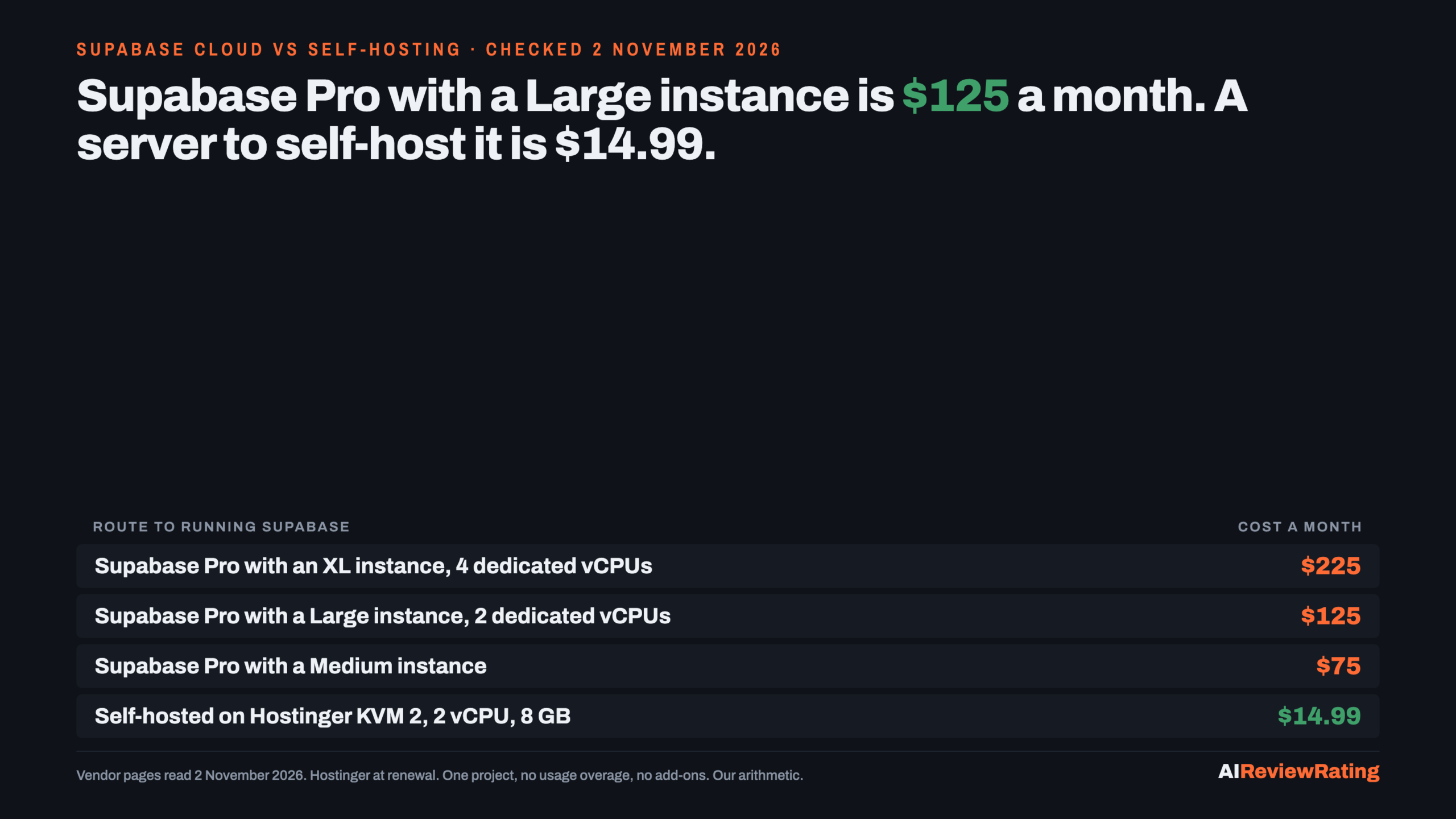
Short answer, prices read on 2 November 2026: Supabase Pro starts at $25 a month and that includes $10 of compute credit, which pays for one Micro instance. The bill climbs with the server you pick: $75 with a Medium instance, $125 with a Large (2 dedicated vCPUs, 8 GB) and $225 with an XL (4 dedicated vCPUs, 16 GB). Self-hosting the Apache-2.0 stack on a Hostinger KVM 2 (2 vCPU, 8 GB) is $14.99 a month at renewal, so the Large-instance project saves $110.01 a month ($1,320.12 a year). Below a Small instance the saving is $15.01 or less and not worth a server. What you give up is real: managed backups, point in time recovery, branching and multiple projects. At an assumed $50 an hour, the Large saving is gone after 2.20 hours of upkeep a month.
| Cloud route | Cloud a month | Comparable server | Server a month | Saving a month | Saving a year | Hours of upkeep at $50/h that erase it |
|---|---|---|---|---|---|---|
| Supabase Pro with Micro | $25 | KVM 2 | $14.99 | $10.01 | $120.12 | 0.20 |
| Supabase Pro with Small | $30 | KVM 2 | $14.99 | $15.01 | $180.12 | 0.30 |
| Supabase Pro with Medium | $75 | KVM 2 | $14.99 | $60.01 | $720.12 | 1.20 |
| Supabase Pro with Large | $125 | KVM 2 Our pick | $14.99 | $110.01 | $1,320.12 | 2.20 |
| Supabase Pro with XL | $225 | KVM 4 | $28.99 | $196.01 | $2,352.12 | 3.92 |
Our pick means we earn a commission if you buy through our link. Hostinger is our pick for the server because it is the host we already price across our self-hosting guides; its KVM 2 plan (2 vCPU, 8 GB RAM, 100 GB NVMe) is $8.79 a month on a promotion, paid upfront for 24 months, and renews at $14.99. Our editor score for Hostinger is 1.9 out of 10, unchanged by the commission. See Hostinger VPS plans.
What Supabase charges, and where the bill really comes from
Supabase’s pricing page lists a free plan, Pro from $25 a month and Team from $599 a month. The free plan pauses projects after 1 week of inactivity and allows 2 active projects, so it suits a trial. Pro includes 100K monthly active users, 8 GB of disk, 250 GB of bandwidth, daily backups kept for 7 days and email support. Every project runs on its own Postgres server and Supabase bills that server hourly, so the plan fee is the small part and the instance is the big part. The instances are Micro $10, Small $15, Medium $60, Large $110 (2 dedicated vCPUs, 8 GB) and XL $210 (4 dedicated vCPUs, 16 GB), and the $10 credit offsets any of them, not only Micro. A second project adds a second instance charge.
Usage then stacks on top. Pro includes 250 GB of egress and charges $0.09 a GB beyond that; it includes 100,000 monthly active users and charges $0.00325 per user beyond that. As an illustration only, a project serving 1,000 GB of egress a month and 250,000 active users would add $67.50 and $487.50, taking a Large-instance Pro bill from $125 to $680. A KVM 4 server at $28.99 lists 16 TB of bandwidth, and the software’s licence charges nothing per user. Whether one server survives that load is a question we did not test. Point in time recovery is a paid add-on from $100 a month, which puts a Large-instance project with it at $225.
What self-hosting Supabase actually involves
Supabase’s Docker guide lists a minimum of 4 GB of RAM, 2 CPU cores and a 40 GB SSD, and recommends 8 GB or more, 4 cores or more and an 80 GB or larger SSD. It describes the minimum as suitable for development and small to medium production workloads. The stack is 13 components (Studio, Envoy, Auth, PostgREST, Realtime, Storage, imgproxy, postgres-meta, Postgres, Edge Runtime, Logflare, Vector, Supavisor), which is why we treat the $14.99 KVM 2 (2 vCPU, 8 GB) as the floor and the $28.99 KVM 4 (4 vCPU, 16 GB) as the safe choice. That sizing is our reading of the docs, not a benchmark: we did not install Supabase or measure memory.
The guide is candid about the work. When you self-host you are responsible for server provisioning, security hardening and OS updates, service configuration, Postgres maintenance, high availability, backups and disaster recovery, and monitoring and uptime. Support is community-supported. The default install is HTTP only, so production needs a reverse proxy with a TLS certificate, and logs and analytics are off by default to save memory. Supabase publishes stable snapshots of the Docker Compose setup about once a month and an update script applies them. Hostinger includes free weekly backups of the VPS on its page, which is a server snapshot, not point in time recovery. See Hostinger VPS plans.
Then the feature list. Supabase says these managed-platform features are not available when self-hosting: branching, advanced metrics beyond logs, managed backups and point in time recovery, analytics and vector buckets, ETL and the Management API. Self-hosted Supabase also runs as a single project, so Studio has no multiple organisations or projects. If your plan was one server holding several client databases, that is a different design.
The break-even: the saving against your hours
Read the table above this way. Up to a Small instance the whole saving is $15.01 a month or less, which is 0.30 of an hour of anyone’s time, so stay on Pro. At Medium it is $60.01 a month and 1.20 hours of upkeep erase it. At Large it is $110.01 a month, $1,320.12 a year, and about 2.20 hours erase it. At XL it is $196.01 a month against a KVM 4, and 3.92 hours erase it. The case for self-hosting is strongest where you would otherwise buy a dedicated-CPU instance, where usage overage is likely, and where one person already runs servers and owns backups. Do not count the managed backup you stop paying for as a saving unless you have written the restore procedure and tested it.
Related reading: Dify Cloud against self-hosting: the cost runs the same cloud-against-server maths for Dify, Self-hosted AI agent platforms compared compares self-hosted agent platforms, What it costs to self-host n8n prices the same server for another self-hosted tool, and Self-hosting an LLM against paying per token: the break-even runs the break-even for hosting the model itself.
The licence question
Supabase is the simple case compared with some open-source tools. GitHub’s API reports the repository licence as Apache-2.0 and the LICENSE file is the standard Apache License Version 2.0. We found no multi-tenant or logo clause of the kind Dify’s licence has, but we did not read every service’s own repository, and a business reselling a hosted Supabase should have a lawyer read each component. The repository showed 114,427 GitHub stars on 2 November 2026.
When Supabase Cloud is still the right buy
- Your project fits a Micro or Small instance. The bill is $25 to $30 a month and the self-hosting saving is $10.01 to $15.01.
- Nobody owns backups. Managed daily backups are included on Pro and point in time recovery is an add-on. Self-hosting hands both to you.
- You need branching, several projects or the Management API. Supabase lists all three as unavailable when self-hosting.
- You are still testing. The free plan covers 2 active projects; do not buy a server for an idea.
How we checked
Every price on this page was read on the vendor’s own page in a rendered browser on 2 November 2026: Supabase’s pricing page, its billing and compute pages, its self-hosting overview and Docker guide, the repository licence and GitHub REST API, and Hostinger’s VPS page. All 32 facts are logged with the exact quote and evidence file. The usage example loads (1,000 GB egress, 250,000 active users), the instance-to-server pairing and the totals are our arithmetic. We did not install or run Supabase, so this is a price and feature check, not a performance or reliability test.
Questions people ask about Supabase costs
How much does Supabase cost?
Supabase Pro starts at $25 a month and includes $10 of compute credit, enough for one Micro instance. Larger instances add to that: a Medium project is $75, a Large $125 and an XL $225. Team starts at $599. Usage beyond the included egress and monthly active users is extra. Read 2 November 2026.
Is Supabase free?
There is a free plan with 2 active projects that pauses a project after 1 week of inactivity, and the software is open source under Apache-2.0 so you can host it yourself. Read 2 November 2026.
How much does it cost to self-host Supabase?
The software is free; the server is the cost. A Hostinger KVM 2 (2 vCPU, 8 GB RAM) is $8.79 a month promotional and $14.99 at renewal, and a KVM 4 (4 vCPU, 16 GB) is $12.99 and $28.99, paid upfront for 24 months. Backups, monitoring and engineer time are extra.
What hardware does self-hosted Supabase need?
Supabase’s Docker guide lists a minimum of 4 GB RAM, 2 cores and a 40 GB SSD, and recommends 8 GB or more, 4 cores or more and an 80 GB or larger SSD. That is the vendor’s guidance, not our benchmark.
What do you lose by self-hosting Supabase?
Supabase lists branching, advanced metrics beyond logs, managed backups and point in time recovery, analytics and vector buckets, ETL and the Management API as unavailable when self-hosting, and the install runs a single project. Support is community-supported.
When is Supabase Cloud cheaper than self-hosting?
When the saving is smaller than your upkeep time. At an assumed $50 an hour, a Small-instance project saves $15.01 a month (0.30 hours) and a Large-instance project $110.01 (2.20 hours). Our arithmetic.
Related reading
- Dify Cloud against self-hosting: the cost
- Self-hosted AI agent platforms compared
- What it costs to self-host n8n
- Self-hosting an LLM against paying per token: the break-even
Sources
- Supabase pricing, read 2 November 2026.
- Supabase docs: billing and compute, read 2 November 2026.
- Supabase docs: self-hosting overview and Docker guide, read 2 November 2026.
- Supabase on GitHub (licence and REST API), read 2 November 2026.
- Hostinger VPS hosting, read 2 November 2026.
Comments
Sign in to join the discussion.
Login to comment