The short answer
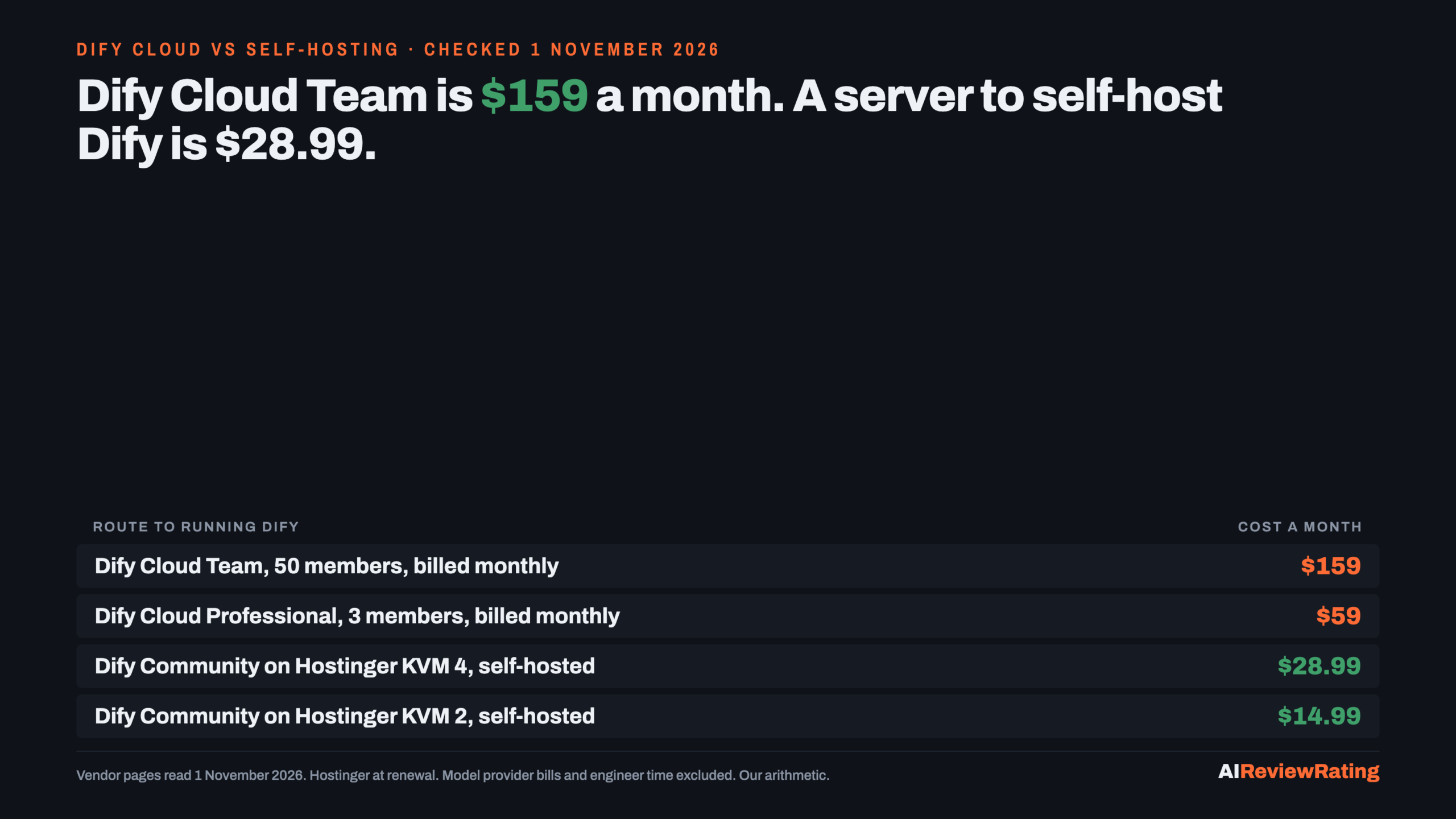
Short answer, prices read on 1 November 2026: Dify Cloud charges per workspace: Professional $59 a month (3 members) or Team $159 a month (50 members), $590 and $1,590 a year if billed annually. Self-hosting the free Community edition costs the server: a Hostinger KVM 2 is $14.99 a month at renewal and a KVM 4 is $28.99. A three-person team saves $44.01 a month ($528.12 a year) against Professional billed monthly, and a larger team saves $130.01 a month ($1,560.12 a year) against Team. The catch is your time: at an assumed $50 an hour, the Team saving is gone after 2.60 hours of upkeep a month, and the Professional saving after 0.88 hours.
| Route | Monthly cost | Members and limits | What you run |
|---|---|---|---|
| Dify Cloud Professional, billed monthly | $59 | 3 members, 50 apps, 500 documents, 5GB | Nothing |
| Dify Cloud Professional, billed annually | $49.17 ($590 a year) | Same | Nothing |
| Dify Cloud Team, billed monthly | $159 | 50 members, 200 apps, 1,000 documents, 20GB | Nothing |
| Dify Cloud Team, billed annually | $132.50 ($1,590 a year) | Same | Nothing |
| Dify Community on Hostinger KVM 4 Our pick | $28.99 | Single workspace; the pricing page lists no member or app caps | A server, upgrades, backups |
| Dify Community on Hostinger KVM 2 | $14.99 | Same; 2 vCPU, 8 GB is the floor we would use | A smaller server |
Our pick means we earn a commission if you buy through our link. Hostinger is our pick for the server because it is the host we already price across our self-hosting guides; its KVM 4 plan (4 vCPU, 16 GB RAM, 200 GB NVMe) is $12.99 a month on a promotion, paid upfront for 24 months, and renews at $28.99. Our editor score for Hostinger is 1.9 out of 10, unchanged by the commission. See Hostinger VPS plans.
What Dify Cloud charges, and what the limits mean
Dify’s pricing page lists three cloud plans. Sandbox is free: one member, 5 apps, 50 knowledge documents and 200 message credits, which suits a trial and nothing more. Professional is $59 per workspace a month, or $590 a year (the page says annual billing saves 17%, and $590 against twelve months at $59 is $708). It allows 3 team members, 50 apps, 500 knowledge documents, 5GB of knowledge storage and 5,000 message credits a month. Team is $159 a month or $1,590 a year, with 50 members, 200 apps, 1,000 documents, 20GB and 10,000 message credits. Prices exclude tax, which may be added at checkout.
Two details change the maths. First, the member cap is the real price gate: a fourth person takes you from $59 to $159, a jump of $100 a month. Second, message credits are a trial allowance, not a model budget. Dify says they let you try models from OpenAI, Anthropic, Gemini, xAI and Tongyi and that once they are used up you switch to your own API key. So the model bill sits outside both the cloud and the self-hosted figures on this page.
What self-hosting Dify actually involves
The Community edition is free, runs as a single workspace and, per the pricing page, carries all core features released in the public repository. Dify’s Docker Compose guide lists the minimum as 2 CPU cores and 4 GiB of RAM and asks for Docker Compose 2.24.0 or later on Linux. Starting the stack brings up 7 core services (api, api_websocket, worker, worker_beat, web, plugin_daemon, agent_backend), 8 dependent components (weaviate, a Postgres database, redis, nginx, two SSRF proxies and two sandboxes) and one initialisation task that exits when done. That is 15 long-running containers on one machine, which is why we treat the $14.99 KVM 2 (2 vCPU, 8 GB RAM) as the floor and the $28.99 KVM 4 (4 vCPU, 16 GB RAM) as the safe choice. That sizing is our reading of the docs, not a benchmark: we did not install Dify, run a workflow or measure memory.
Setup has one trap worth knowing before you start: the guide requires you to generate a token and set DIFY_AGENT_LOCAL_SANDBOX_AUTH_TOKEN in the .env file, and the agent backend and its sandbox do not start without it. Upgrades are manual too. The guide says the steps vary between releases and tells you to compare each .env.example with your .env afterwards and re-apply any edits to the compose file. That is the recurring work the monthly saving pays for. Hostinger bills plans upfront, so the monthly rate is the plan total divided by 24 months. See Hostinger VPS plans.
The break-even: the saving against your hours
| Team size | Cloud plan, billing | Cloud cost a month | Server | Server a month | Saving a month | Saving a year | Hours of upkeep at $50/h that erase it |
|---|---|---|---|---|---|---|---|
| 1 to 3 | Professional, monthly | $59 | KVM 2 | $14.99 | $44.01 | $528.12 | 0.88 |
| 1 to 3 | Professional, annual | $49.17 | KVM 2 | $14.99 | $34.18 | $410.12 | 0.68 |
| 4 to 50 | Team, monthly | $159 | KVM 4 | $28.99 | $130.01 | $1,560.12 | 2.60 |
| 4 to 50 | Team, annual | $132.50 | KVM 4 | $28.99 | $103.51 | $1,242.12 | 2.07 |
Read it this way. For a team of three, the server saves $44.01 a month against monthly Professional but only $34.18 against annual billing, and that is less than an hour of anyone’s time. The case for self-hosting at that size is control, not price. For a team of four or more, Team is $159 and the server is $28.99, so the saving is $130.01 a month, $1,560.12 a year, and two to three hours of upkeep a month still leaves you ahead. The saving grows with team size only through the plan jump; a three-person team on a KVM 4 saves $30.01 a month against Professional, which is thin.
The licence question for a business
GitHub’s API reports the repository’s licence as NOASSERTION, because Dify uses a modified Apache License 2.0 with added conditions. The LICENSE file says Dify may be used commercially, including as a backend service for other applications or as an application development platform for enterprises, but a commercial licence is required if you operate a multi-tenant environment (it defines one tenant as one workspace) or remove or modify the logo and copyright information in the console or applications. The pricing page, meanwhile, describes Community as being for “open-source enthusiasts, individual developers, and non-commercial projects”, and lists “Commercial License Authorization”, multiple workspaces and SSO as Enterprise-only, at a price it does not publish (Custom, contact sales). We are not lawyers and the two pages do not read identically, so a business that resells Dify to clients, or wants one workspace per client, should ask Dify in writing before building on the free edition. The repository showed 160,181 GitHub stars on 1 November 2026.
Related reading: Self-hosted AI agent platforms compared compares Dify with other self-hosted agent platforms, What it costs to self-host n8n prices the same server for another self-hosted tool, and Self-hosting an LLM against paying per token: the break-even runs the break-even for hosting the model itself.
When Dify Cloud is still the right buy
- You are one to three people and bill annually. $49.17 a month against a $14.99 server leaves $34.18, which 0.68 hours of upkeep erases at $50 an hour.
- Nobody owns a server. Every self-hosted figure here excludes engineer time, and the compose stack is 15 containers with manual upgrades.
- You need several workspaces or SSO. The pricing page lists both as Enterprise features, so the free edition is not an option, and the server saving is moot.
- You are still testing. The free Sandbox covers one member and 5 apps; do not buy a server for an idea.
How we checked
Every price on this page was read on the vendor’s own page in a rendered browser on 1 November 2026: Dify’s pricing page, its Docker Compose guide, the Dify Open Source License on GitHub and Hostinger’s VPS page. Dify animates the digits of its cloud prices, so the plain text of the page cannot be read for them; we took the $59, $159, $590 and $1,590 figures from screenshots of the page in both billing states and logged our transcription as evidence. The star count comes from GitHub’s REST API. All 33 facts are logged with the exact quote and evidence file. The break-evens and every total are our arithmetic. We did not install or run Dify, so this is a price and licence check, not a performance or reliability test.
Questions people ask about Dify costs
How much does Dify Cloud cost?
Dify Cloud Professional is $59 per workspace a month or $590 a year, and Team is $159 a month or $1,590 a year. Sandbox is free. Prices exclude tax. Read 1 November 2026.
Is Dify free?
Dify has a free Sandbox on its cloud (1 member, 5 apps, 200 message credits) and a free Community edition you host yourself, which runs as a single workspace. Read 1 November 2026.
How much does it cost to self-host Dify?
The software is free; the server is the cost. A Hostinger KVM 2 (2 vCPU, 8 GB RAM) is $8.79 a month promotional and $14.99 at renewal, and a KVM 4 (4 vCPU, 16 GB) is $12.99 and $28.99, paid upfront for 24 months. Model provider bills and engineer time are extra.
What hardware does Dify need?
Dify’s Docker Compose guide lists a minimum of 2 CPU cores and 4 GiB of RAM. The stack starts 15 long-running containers plus one initialisation task, so we price 8 GB as the floor. That is our reading, not a benchmark.
Can I use self-hosted Dify commercially?
The LICENSE allows commercial use, but requires a commercial licence for a multi-tenant environment (one tenant is one workspace) or if you remove the logo and copyright information in the console or apps. The pricing page describes Community as for non-commercial projects, so a business should confirm with Dify in writing.
What does Dify Enterprise cost?
Dify does not publish a price: its pricing page shows Custom with a contact-sales button. Enterprise adds the commercial licence authorization, multiple workspaces and SSO.
When is Dify Cloud cheaper than self-hosting?
When the saving is smaller than your upkeep time. At an assumed $50 an hour, the saving against annual Professional ($34.18 a month) is gone after 0.68 hours, and against monthly Team ($130.01) after 2.60 hours. Our arithmetic.
Related reading
- Self-hosted AI agent platforms compared
- What it costs to self-host n8n
- Self-hosting an LLM against paying per token: the break-even
- Open source alternatives to paid AI tools
Sources
- Dify pricing, read 1 November 2026.
- Dify docs: self-host with Docker Compose, read 1 November 2026.
- Dify Open Source License and GitHub REST API, read 1 November 2026.
- Hostinger VPS hosting, read 1 November 2026.
Comments
Sign in to join the discussion.
Login to comment